> ## Documentation Index
> Fetch the complete documentation index at: https://docs.ravvio.in/llms.txt
> Use this file to discover all available pages before exploring further.
# Testing Workflow
> Comprehensive testing workflow and methodology for optimizing your AI agent performance
## Testing Workflow Overview
A systematic testing workflow ensures your AI agent performs optimally before deployment, providing consistent, accurate, and helpful responses that align with your business objectives and brand voice.
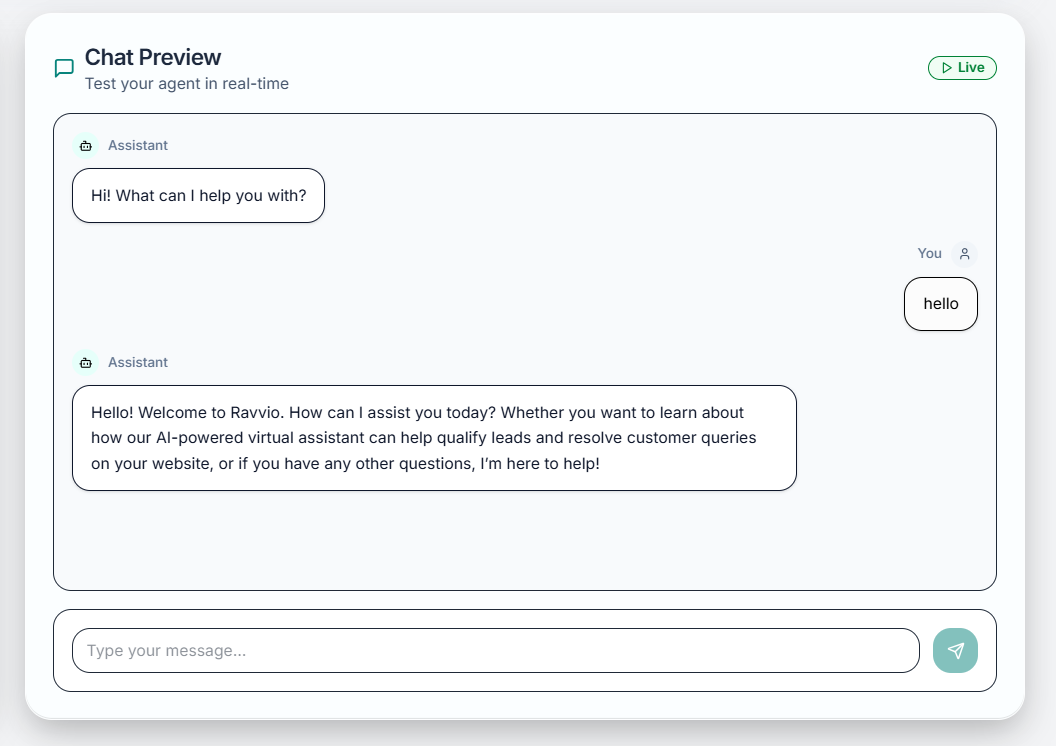 ### Workflow Benefits
Systematic validation of agent performance before live deployment
Identify and resolve issues in safe testing environment
Continuous improvement through structured testing cycles
Ensure optimal user interactions and satisfaction
## Pre-Testing Preparation
### Initial Setup Requirements
**System Prompt Validation:**
* Verify system prompt completeness and clarity
* Ensure personality traits align with brand voice
* Confirm expertise areas match business focus
* Validate response style preferences
**Agent Settings Check:**
* Review agent name and identification
* Confirm lead capture configuration
* Validate demo booking integration settings
* Check knowledge base connection status
**Content Assessment:**
* Confirm all relevant documents are uploaded
* Verify processing completion and index status
* Review content organization and structure
* Validate information accuracy and currency
**Coverage Analysis:**
* Identify potential knowledge gaps
* Ensure comprehensive topic coverage
* Verify FAQ and common question inclusion
* Check product/service information completeness
**Scenario Development:**
* Define user personas and interaction types
* Create comprehensive question sets
* Plan edge case and stress testing
* Establish success criteria and metrics
**Testing Environment:**
* Access playground with appropriate permissions
* Prepare testing tools and documentation
* Set up performance monitoring
* Configure session management preferences
### Testing Objectives Definition
**Core Functionality:**
* Validate accurate responses to common questions
* Confirm appropriate handling of complex queries
* Test knowledge base information retrieval
* Verify lead capture and conversion flows
**Performance Standards:**
* Response time within acceptable limits
* Consistency across different conversation types
* Appropriate escalation and fallback behaviors
* Integration functionality with external systems
**Response Quality:**
* Accuracy of information provided
* Relevance to user questions and context
* Consistency with brand voice and personality
* Helpfulness and user satisfaction potential
**User Experience:**
* Natural conversation flow and transitions
* Clear and understandable language use
* Appropriate response length and detail
* Engaging and professional interaction style
## Core Testing Workflow
### Phase 1: Basic Functionality Testing
**Environment Setup:**
* Start new playground session
* Confirm agent configuration is active
* Verify knowledge base connectivity
* Check system prompt application
**Initial Validation:**
* Send simple greeting to test basic responsiveness
* Verify agent personality and tone consistency
* Confirm appropriate introduction and context
* Test basic conversational capabilities
**Essential Functions:**
* Test response to frequently asked questions
* Validate product/service information accuracy
* Confirm pricing and availability queries
* Test contact information and support processes
**Knowledge Base Integration:**
* Ask questions that should reference uploaded documents
* Verify accurate information retrieval
* Test cross-referencing between different documents
* Confirm proper source attribution when relevant
**Capture Flow Testing:**
* Test natural lead capture integration
* Verify email collection forms function correctly
* Confirm demo booking integration works properly
* Validate data storage and accessibility
**Conversion Optimization:**
* Test different approaches to requesting contact information
* Evaluate timing and context of capture attempts
* Assess user experience and friction points
* Optimize messaging for better conversion rates
### Phase 2: Advanced Scenario Testing
**Multi-Part Questions:**
* Test questions with multiple components
* Verify comprehensive response coverage
* Confirm logical organization of information
* Assess clarity and completeness of answers
**Context-Dependent Queries:**
* Test follow-up questions requiring conversation context
* Verify proper context maintenance across interactions
* Confirm appropriate reference to previous messages
* Assess conversation flow and natural transitions
**Boundary Conditions:**
* Test questions outside knowledge base scope
* Verify appropriate handling of unknown topics
* Confirm graceful fallback responses
* Test escalation triggers and human handoff
**Unusual Interactions:**
* Test responses to inappropriate or off-topic questions
* Verify professional handling of difficult situations
* Confirm security and privacy protection measures
* Assess error handling and recovery capabilities
### Phase 3: Performance and Load Testing
**Performance Metrics:**
* Measure individual response times
* Calculate average response speed
* Identify slow response patterns
* Compare against performance benchmarks
**Optimization Opportunities:**
* Identify knowledge base queries causing delays
* Assess system prompt complexity impact
* Test configuration changes for speed improvement
* Validate optimizations maintain quality standards
**Response Validation:**
* Ask same questions multiple times
* Verify consistent information and tone
* Test response stability across sessions
* Confirm personality maintenance throughout conversations
**Quality Assurance:**
* Compare responses to similar questions
* Evaluate information accuracy and completeness
* Assess user experience consistency
* Validate brand voice alignment across interactions
## Iterative Improvement Process
### Testing Cycle Implementation
**Continuous Improvement:**
* Conduct systematic testing sessions
* Analyze results and identify improvement opportunities
* Implement configuration changes and optimizations
* Retest to validate improvements and measure progress
**Metrics-Based Optimization:**
* Track performance metrics over time
* Identify trends and patterns in agent performance
* Make evidence-based configuration adjustments
* Monitor impact of changes on key success metrics
### Configuration Refinement Process
Document specific problems or improvement opportunities identified during testing
Investigate underlying causes of performance issues or quality problems
Make targeted changes to system prompts, knowledge base, or configuration settings
Retest specific areas to confirm improvements and validate solution effectiveness
## Quality Assurance Framework
### Testing Documentation
**Test Scenario Recording:**
* Document all test scenarios and questions used
* Record expected vs. actual responses
* Note configuration settings during testing
* Track performance metrics and quality ratings
**Issue Tracking:**
* Log all identified problems and improvement opportunities
* Document resolution steps and configuration changes
* Track improvement progress over time
* Maintain audit trail for quality assurance
**Key Performance Indicators:**
* Response time averages and trends
* Response quality ratings and improvements
* Knowledge base utilization and effectiveness
* Lead capture conversion rates and optimization
**Comparative Analysis:**
* Before and after comparison of improvements
* Configuration change impact assessment
* Performance trending over time
* Benchmark comparison against industry standards
### Team Collaboration
Share testing results with relevant team members for feedback and validation
Work with marketing, sales, and customer service teams to refine agent responses
Ensure agent performance aligns with business objectives and customer expectations
Obtain appropriate approvals before deploying optimized configuration to production
## Testing Best Practices
### Systematic Approach
**Testing Scope:**
* Cover all major use cases and customer scenarios
* Test both common and edge case interactions
* Validate all agent features and integrations
* Ensure testing reflects real user behavior patterns
**User Simulation:**
* Use actual customer questions from support logs
* Test with different user personas and interaction styles
* Simulate various customer journey stages
* Include mobile and desktop testing scenarios
### Optimization Guidelines
**Response Quality:**
* Focus on accuracy and relevance over response speed alone
* Maintain consistency in tone and personality
* Ensure comprehensive coverage of important topics
* Optimize for user satisfaction and experience
**Technical Performance:**
* Balance response detail with processing speed
* Optimize knowledge base organization for faster retrieval
* Streamline system prompts for efficiency without losing quality
* Monitor resource usage and scalability implications
**Regular Testing Schedule:**
* Conduct weekly testing sessions during initial optimization
* Implement monthly testing for ongoing maintenance
* Perform testing after any configuration changes
* Schedule quarterly comprehensive reviews and optimizations
**Adaptation and Evolution:**
* Update testing scenarios based on actual user feedback
* Incorporate new business information and changes
* Adapt to seasonal or promotional content updates
* Evolve testing approach based on lessons learned
## Deployment Readiness Assessment
### Pre-Deployment Checklist
**Complete Feature Testing:**
* All core functions tested and working correctly
* Knowledge base integration fully operational
* Lead capture and demo booking systems validated
* Performance metrics meet established benchmarks
**Quality Standards:**
* Response quality consistently meets or exceeds expectations
* Brand voice and personality alignment confirmed
* User experience optimized for target audience
* Edge case handling appropriate and professional
**Technical Requirements:**
* Response times within acceptable limits
* System stability under various load conditions
* Integration with external systems functioning properly
* Error handling and recovery mechanisms working
**User Experience:**
* Conversation flow natural and engaging
* Information provided accurate and helpful
* Lead capture process smooth and non-intrusive
* Mobile and desktop compatibility confirmed
**Strategic Objectives:**
* Agent responses support business goals
* Lead generation and conversion optimization complete
* Customer service standards met or exceeded
* Brand representation consistent and professional
**Stakeholder Approval:**
* Testing results reviewed and approved by relevant teams
* Configuration changes documented and validated
* Deployment timeline and rollback plans established
* Success metrics and monitoring plans defined
### Final Validation Process
**Documentation Review:**
* Complete testing documentation and results
* All identified issues resolved or documented
* Configuration changes logged and validated
* Performance metrics within acceptable ranges
**Quality Assurance:**
* Independent validation of critical functionality
* Peer review of testing results and conclusions
* Verification of business requirement fulfillment
* Confirmation of deployment readiness criteria
**Deployment Planning:**
* Production deployment strategy defined
* Monitoring and alerting systems configured
* Rollback procedures documented and tested
* Support team briefed on new configuration
**Launch Monitoring:**
* Real-time performance monitoring during initial deployment
* User feedback collection mechanisms activated
* Support escalation procedures reviewed and ready
* Success metrics tracking initiated
## Post-Deployment Testing
### Production Validation
Monitor agent performance closely during first 24-48 hours after deployment
Gather initial user feedback and interaction data for analysis
Compare production performance against testing environment results
Identify any additional optimization opportunities based on real user interactions
### Ongoing Maintenance Testing
**Scheduled Testing:**
* Weekly spot checks of core functionality
* Monthly comprehensive testing sessions
* Quarterly full system reviews and optimizations
* Annual strategic alignment and capability assessment
**Dynamic Optimization:**
* Response to user feedback and support requests
* Adaptation to business changes and new products
* Seasonal content updates and testing
* Competitive analysis and feature enhancement
**Testing Documentation**: Maintain comprehensive records of all testing activities, results, and optimizations to support continuous improvement and knowledge sharing.
**Regular Reviews**: Schedule regular testing workflow reviews to identify opportunities for process improvement and ensure testing remains aligned with business objectives.
**Production Impact**: Never test experimental configurations directly in production. Always validate changes thoroughly in the playground environment first.
### Workflow Benefits
Systematic validation of agent performance before live deployment
Identify and resolve issues in safe testing environment
Continuous improvement through structured testing cycles
Ensure optimal user interactions and satisfaction
## Pre-Testing Preparation
### Initial Setup Requirements
**System Prompt Validation:**
* Verify system prompt completeness and clarity
* Ensure personality traits align with brand voice
* Confirm expertise areas match business focus
* Validate response style preferences
**Agent Settings Check:**
* Review agent name and identification
* Confirm lead capture configuration
* Validate demo booking integration settings
* Check knowledge base connection status
**Content Assessment:**
* Confirm all relevant documents are uploaded
* Verify processing completion and index status
* Review content organization and structure
* Validate information accuracy and currency
**Coverage Analysis:**
* Identify potential knowledge gaps
* Ensure comprehensive topic coverage
* Verify FAQ and common question inclusion
* Check product/service information completeness
**Scenario Development:**
* Define user personas and interaction types
* Create comprehensive question sets
* Plan edge case and stress testing
* Establish success criteria and metrics
**Testing Environment:**
* Access playground with appropriate permissions
* Prepare testing tools and documentation
* Set up performance monitoring
* Configure session management preferences
### Testing Objectives Definition
**Core Functionality:**
* Validate accurate responses to common questions
* Confirm appropriate handling of complex queries
* Test knowledge base information retrieval
* Verify lead capture and conversion flows
**Performance Standards:**
* Response time within acceptable limits
* Consistency across different conversation types
* Appropriate escalation and fallback behaviors
* Integration functionality with external systems
**Response Quality:**
* Accuracy of information provided
* Relevance to user questions and context
* Consistency with brand voice and personality
* Helpfulness and user satisfaction potential
**User Experience:**
* Natural conversation flow and transitions
* Clear and understandable language use
* Appropriate response length and detail
* Engaging and professional interaction style
## Core Testing Workflow
### Phase 1: Basic Functionality Testing
**Environment Setup:**
* Start new playground session
* Confirm agent configuration is active
* Verify knowledge base connectivity
* Check system prompt application
**Initial Validation:**
* Send simple greeting to test basic responsiveness
* Verify agent personality and tone consistency
* Confirm appropriate introduction and context
* Test basic conversational capabilities
**Essential Functions:**
* Test response to frequently asked questions
* Validate product/service information accuracy
* Confirm pricing and availability queries
* Test contact information and support processes
**Knowledge Base Integration:**
* Ask questions that should reference uploaded documents
* Verify accurate information retrieval
* Test cross-referencing between different documents
* Confirm proper source attribution when relevant
**Capture Flow Testing:**
* Test natural lead capture integration
* Verify email collection forms function correctly
* Confirm demo booking integration works properly
* Validate data storage and accessibility
**Conversion Optimization:**
* Test different approaches to requesting contact information
* Evaluate timing and context of capture attempts
* Assess user experience and friction points
* Optimize messaging for better conversion rates
### Phase 2: Advanced Scenario Testing
**Multi-Part Questions:**
* Test questions with multiple components
* Verify comprehensive response coverage
* Confirm logical organization of information
* Assess clarity and completeness of answers
**Context-Dependent Queries:**
* Test follow-up questions requiring conversation context
* Verify proper context maintenance across interactions
* Confirm appropriate reference to previous messages
* Assess conversation flow and natural transitions
**Boundary Conditions:**
* Test questions outside knowledge base scope
* Verify appropriate handling of unknown topics
* Confirm graceful fallback responses
* Test escalation triggers and human handoff
**Unusual Interactions:**
* Test responses to inappropriate or off-topic questions
* Verify professional handling of difficult situations
* Confirm security and privacy protection measures
* Assess error handling and recovery capabilities
### Phase 3: Performance and Load Testing
**Performance Metrics:**
* Measure individual response times
* Calculate average response speed
* Identify slow response patterns
* Compare against performance benchmarks
**Optimization Opportunities:**
* Identify knowledge base queries causing delays
* Assess system prompt complexity impact
* Test configuration changes for speed improvement
* Validate optimizations maintain quality standards
**Response Validation:**
* Ask same questions multiple times
* Verify consistent information and tone
* Test response stability across sessions
* Confirm personality maintenance throughout conversations
**Quality Assurance:**
* Compare responses to similar questions
* Evaluate information accuracy and completeness
* Assess user experience consistency
* Validate brand voice alignment across interactions
## Iterative Improvement Process
### Testing Cycle Implementation
**Continuous Improvement:**
* Conduct systematic testing sessions
* Analyze results and identify improvement opportunities
* Implement configuration changes and optimizations
* Retest to validate improvements and measure progress
**Metrics-Based Optimization:**
* Track performance metrics over time
* Identify trends and patterns in agent performance
* Make evidence-based configuration adjustments
* Monitor impact of changes on key success metrics
### Configuration Refinement Process
Document specific problems or improvement opportunities identified during testing
Investigate underlying causes of performance issues or quality problems
Make targeted changes to system prompts, knowledge base, or configuration settings
Retest specific areas to confirm improvements and validate solution effectiveness
## Quality Assurance Framework
### Testing Documentation
**Test Scenario Recording:**
* Document all test scenarios and questions used
* Record expected vs. actual responses
* Note configuration settings during testing
* Track performance metrics and quality ratings
**Issue Tracking:**
* Log all identified problems and improvement opportunities
* Document resolution steps and configuration changes
* Track improvement progress over time
* Maintain audit trail for quality assurance
**Key Performance Indicators:**
* Response time averages and trends
* Response quality ratings and improvements
* Knowledge base utilization and effectiveness
* Lead capture conversion rates and optimization
**Comparative Analysis:**
* Before and after comparison of improvements
* Configuration change impact assessment
* Performance trending over time
* Benchmark comparison against industry standards
### Team Collaboration
Share testing results with relevant team members for feedback and validation
Work with marketing, sales, and customer service teams to refine agent responses
Ensure agent performance aligns with business objectives and customer expectations
Obtain appropriate approvals before deploying optimized configuration to production
## Testing Best Practices
### Systematic Approach
**Testing Scope:**
* Cover all major use cases and customer scenarios
* Test both common and edge case interactions
* Validate all agent features and integrations
* Ensure testing reflects real user behavior patterns
**User Simulation:**
* Use actual customer questions from support logs
* Test with different user personas and interaction styles
* Simulate various customer journey stages
* Include mobile and desktop testing scenarios
### Optimization Guidelines
**Response Quality:**
* Focus on accuracy and relevance over response speed alone
* Maintain consistency in tone and personality
* Ensure comprehensive coverage of important topics
* Optimize for user satisfaction and experience
**Technical Performance:**
* Balance response detail with processing speed
* Optimize knowledge base organization for faster retrieval
* Streamline system prompts for efficiency without losing quality
* Monitor resource usage and scalability implications
**Regular Testing Schedule:**
* Conduct weekly testing sessions during initial optimization
* Implement monthly testing for ongoing maintenance
* Perform testing after any configuration changes
* Schedule quarterly comprehensive reviews and optimizations
**Adaptation and Evolution:**
* Update testing scenarios based on actual user feedback
* Incorporate new business information and changes
* Adapt to seasonal or promotional content updates
* Evolve testing approach based on lessons learned
## Deployment Readiness Assessment
### Pre-Deployment Checklist
**Complete Feature Testing:**
* All core functions tested and working correctly
* Knowledge base integration fully operational
* Lead capture and demo booking systems validated
* Performance metrics meet established benchmarks
**Quality Standards:**
* Response quality consistently meets or exceeds expectations
* Brand voice and personality alignment confirmed
* User experience optimized for target audience
* Edge case handling appropriate and professional
**Technical Requirements:**
* Response times within acceptable limits
* System stability under various load conditions
* Integration with external systems functioning properly
* Error handling and recovery mechanisms working
**User Experience:**
* Conversation flow natural and engaging
* Information provided accurate and helpful
* Lead capture process smooth and non-intrusive
* Mobile and desktop compatibility confirmed
**Strategic Objectives:**
* Agent responses support business goals
* Lead generation and conversion optimization complete
* Customer service standards met or exceeded
* Brand representation consistent and professional
**Stakeholder Approval:**
* Testing results reviewed and approved by relevant teams
* Configuration changes documented and validated
* Deployment timeline and rollback plans established
* Success metrics and monitoring plans defined
### Final Validation Process
**Documentation Review:**
* Complete testing documentation and results
* All identified issues resolved or documented
* Configuration changes logged and validated
* Performance metrics within acceptable ranges
**Quality Assurance:**
* Independent validation of critical functionality
* Peer review of testing results and conclusions
* Verification of business requirement fulfillment
* Confirmation of deployment readiness criteria
**Deployment Planning:**
* Production deployment strategy defined
* Monitoring and alerting systems configured
* Rollback procedures documented and tested
* Support team briefed on new configuration
**Launch Monitoring:**
* Real-time performance monitoring during initial deployment
* User feedback collection mechanisms activated
* Support escalation procedures reviewed and ready
* Success metrics tracking initiated
## Post-Deployment Testing
### Production Validation
Monitor agent performance closely during first 24-48 hours after deployment
Gather initial user feedback and interaction data for analysis
Compare production performance against testing environment results
Identify any additional optimization opportunities based on real user interactions
### Ongoing Maintenance Testing
**Scheduled Testing:**
* Weekly spot checks of core functionality
* Monthly comprehensive testing sessions
* Quarterly full system reviews and optimizations
* Annual strategic alignment and capability assessment
**Dynamic Optimization:**
* Response to user feedback and support requests
* Adaptation to business changes and new products
* Seasonal content updates and testing
* Competitive analysis and feature enhancement
**Testing Documentation**: Maintain comprehensive records of all testing activities, results, and optimizations to support continuous improvement and knowledge sharing.
**Regular Reviews**: Schedule regular testing workflow reviews to identify opportunities for process improvement and ensure testing remains aligned with business objectives.
**Production Impact**: Never test experimental configurations directly in production. Always validate changes thoroughly in the playground environment first.