> ## Documentation Index
> Fetch the complete documentation index at: https://docs.ravvio.in/llms.txt
> Use this file to discover all available pages before exploring further.
# Supported File Formats
> Complete guide to supported document formats for training your AI agent
## Overview of Supported Formats
Ravvio's knowledge base supports a comprehensive range of document formats to ensure maximum flexibility in training your AI agent with existing business content and documentation.
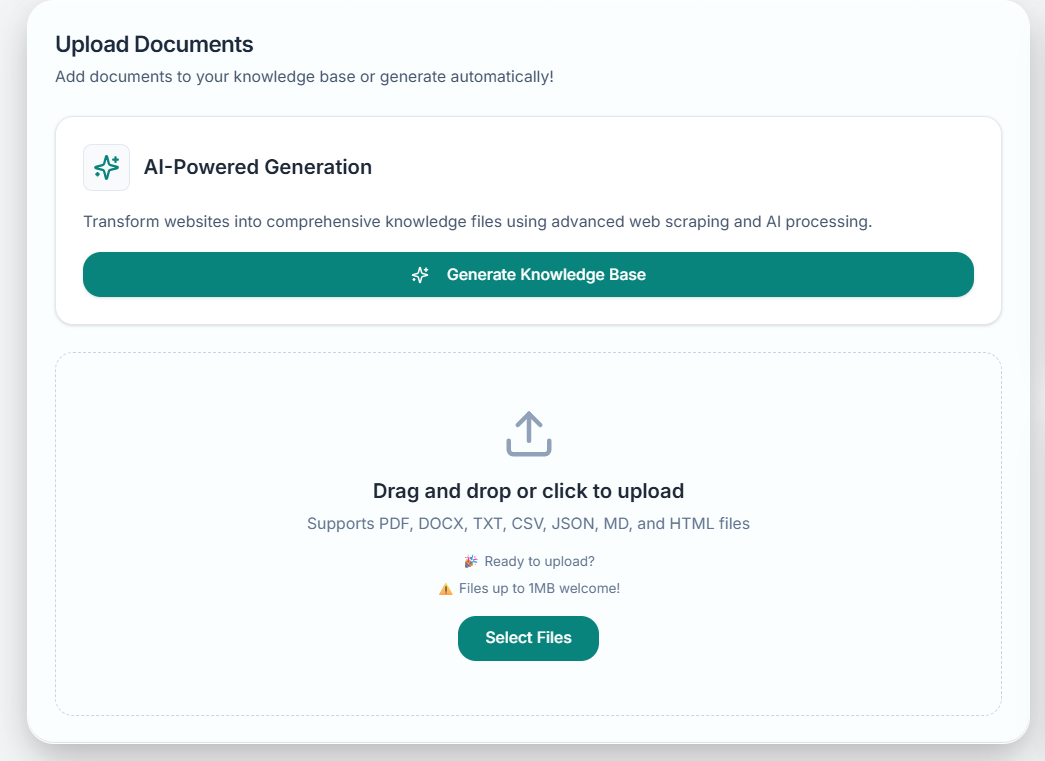 ### File Format Categories
PDF, DOCX, TXT, and MD files for comprehensive text-based content
CSV and JSON files for structured data and tabular information
HTML files for web content and formatted online documentation
Markdown and structured text files for technical documentation
## Detailed Format Support
### PDF Documents
**Supported Content Types:**
* Product manuals and user guides
* Technical documentation and specifications
* Marketing brochures and sales materials
* Policy documents and procedures
* Financial reports and presentations
**Processing Features:**
* Text extraction from standard PDF files
* Table and structured content recognition
* Preservation of document hierarchy and sections
* Header and footer identification
* Footnote and reference extraction
**Current Restrictions:**
* Image-based PDFs (scanned documents) require OCR preprocessing
* Password-protected PDFs need decryption before upload
* Complex layouts may affect text extraction accuracy
* Embedded multimedia content is not processed
**Optimization Tips:**
* Use text-based PDFs when possible for best results
* Ensure PDFs are not password-protected
* Consider converting complex layouts to simpler formats
* Verify text extraction quality in processed results
### Microsoft Word Documents (DOCX)
Complete extraction of text, headings, and paragraph structure
Maintenance of document hierarchy, bullet points, and numbered lists
Capture of document properties, titles, and author information
Recognition and extraction of tabular data and structured information
#### DOCX Best Practices
**Recommended Structure:**
* Use proper heading styles (H1, H2, H3)
* Maintain consistent formatting throughout
* Organize content with clear sections
* Include descriptive titles and headers
**Preparation Tips:**
* Remove unnecessary formatting complexity
* Ensure text is readable and well-organized
* Use bullet points and numbered lists appropriately
* Include comprehensive content without excessive styling
### Plain Text Files (TXT)
**Advantages:**
* Fastest processing and integration
* No formatting complications or extraction errors
* Universal compatibility across all systems
* Smallest file sizes for efficient storage
* Direct text content without conversion overhead
**Ideal Use Cases:**
* FAQ documents and question-answer pairs
* Policy statements and procedure lists
* Product descriptions and feature lists
* Contact information and directory listings
* Simple documentation and reference materials
**Structure Recommendations:**
* Use clear section headers with consistent formatting
* Separate different topics with blank lines
* Include descriptive titles for each section
* Maintain consistent indentation for hierarchies
* Use asterisks or dashes for bullet points
**Content Guidelines:**
* Keep paragraphs concise and focused
* Use consistent terminology throughout
* Include relevant keywords for better searchability
* Organize information logically from general to specific
### CSV Files (Comma-Separated Values)
**Supported Content:**
* Product catalogs with specifications
* Pricing tables and rate sheets
* FAQ databases with questions and answers
* Contact directories and staff listings
* Inventory lists and availability data
**CSV Capabilities:**
* Header row recognition and column mapping
* Data type detection and validation
* Relationship identification between columns
* Automatic formatting for readable responses
#### CSV Optimization
Use clear, descriptive column headers that indicate content type
Ensure consistent data formatting within each column
Fill in all relevant cells to avoid incomplete information
Arrange columns in logical order from most to least important
### JSON Files (JavaScript Object Notation)
**Supported Structures:**
* Nested object hierarchies for complex data
* Array structures for lists and collections
* Key-value pairs for configuration data
* Mixed data types within single files
* Hierarchical content organization
**Processing Capabilities:**
* Automatic structure recognition and parsing
* Preservation of data relationships and hierarchies
* Conversion to readable format for AI responses
* Integration with existing knowledge base content
**Structure Guidelines:**
* Use descriptive key names that indicate content purpose
* Maintain consistent naming conventions throughout
* Organize data logically with clear hierarchies
* Include all necessary fields for complete information
**Content Quality:**
* Ensure valid JSON syntax and formatting
* Use appropriate data types for different content
* Include comprehensive data without unnecessary complexity
* Validate JSON structure before uploading
### Markdown Files (MD)
**Benefits:**
* Perfect for technical documentation
* Excellent formatting preservation
* Code block and syntax highlighting support
* Link and reference management
* Table and list structure recognition
**Ideal Applications:**
* API documentation and developer guides
* Technical specifications and requirements
* User manuals with code examples
* README files and project documentation
* Knowledge base articles with formatting
#### Markdown Processing Features
Complete support for standard Markdown syntax and formatting
Maintenance of headings, lists, tables, and code blocks
Recognition and preservation of internal and external links
Seamless integration with other knowledge base content
### HTML Files
**Supported Elements:**
* Text content from paragraphs, headings, and lists
* Table data and structured information
* Link text and navigation elements
* Meta information and page titles
* Semantic content from HTML5 elements
**Processing Intelligence:**
* Automatic removal of navigation and promotional content
* Focus on main content areas and article text
* Preservation of content hierarchy and structure
* Conversion of HTML formatting to readable text
**Preparation Recommendations:**
* Clean HTML with minimal inline styling
* Semantic markup using appropriate HTML tags
* Clear content separation from navigation elements
* Descriptive page titles and meta information
**Content Quality:**
* Focus on informational content over decorative elements
* Use proper heading hierarchy (h1, h2, h3)
* Include alt text for important images
* Maintain clean, readable HTML structure
## File Size and Limitations
### Size Restrictions
**Maximum file size varies by format:**
* PDF: 50MB maximum
* DOCX: 25MB maximum
* TXT: 10MB maximum
* CSV: 15MB maximum
* JSON: 10MB maximum
* MD: 5MB maximum
* HTML: 5MB maximum
**Overall limitations:**
* Total storage per account varies by plan
* Free accounts: 100MB total storage
* Paid accounts: 1GB+ total storage
* Enterprise: Custom storage allocations
### Performance Considerations
**File size impact:**
* Larger files take longer to process and index
* Complex formatting increases processing time
* Multiple simultaneous uploads may affect speed
* Network speed influences upload and processing time
**Optimization strategies:**
* Break large documents into smaller, focused files
* Remove unnecessary formatting and content
* Upload files during off-peak hours when possible
* Prioritize most important content for faster access
**Best practices:**
* Focus on high-quality, relevant content over volume
* Regular cleanup of outdated or redundant documents
* Strategic organization of content by importance
* Monitoring of knowledge base performance and usage
## Upload Requirements and Recommendations
### Technical Requirements
Ensure files are not corrupted and open properly in their native applications
Verify files meet format standards and are not password-protected
Confirm content is relevant to your business and customer interactions
Review content for accuracy, completeness, and current information
### Naming Conventions
**Best practices:**
* Use descriptive names that indicate content
* Avoid special characters and spaces
* Include version numbers for updated documents
* Use consistent naming across related files
**Structure tips:**
* Group related documents logically
* Use prefixes for different content types
* Include dates for time-sensitive content
* Maintain clear categorization system
## Content Preparation Guidelines
### Pre-Upload Optimization
**Quality checklist:**
* Verify information accuracy and currency
* Remove outdated or irrelevant content
* Ensure completeness of important topics
* Check for consistency in terminology and style
**Relevance assessment:**
* Focus on customer-facing information
* Include frequently asked questions and answers
* Prioritize product and service details
* Consider user journey and information needs
**Document preparation:**
* Clean up formatting inconsistencies
* Use standard fonts and readable text sizes
* Organize content with clear headings and structure
* Remove unnecessary graphics and decorative elements
**Content enhancement:**
* Add descriptive titles and section headers
* Include relevant keywords naturally
* Provide context for abbreviations and technical terms
* Ensure logical flow and organization
### Testing and Validation
Test upload process with a small sample of documents first
Confirm documents process correctly without errors
Verify extracted content matches original document intent
Test AI agent responses using content from uploaded documents
**File Format Support**: While Ravvio supports these formats, optimal results depend on document quality, structure, and content organization. Well-formatted, clearly structured documents will provide better AI agent performance.
**Start Small**: Begin with a few high-quality documents to test processing and agent responses before uploading your entire document library.
**Copyright Compliance**: Ensure you have proper rights to use all uploaded content and that it complies with your organization's content policies and legal requirements.
### File Format Categories
PDF, DOCX, TXT, and MD files for comprehensive text-based content
CSV and JSON files for structured data and tabular information
HTML files for web content and formatted online documentation
Markdown and structured text files for technical documentation
## Detailed Format Support
### PDF Documents
**Supported Content Types:**
* Product manuals and user guides
* Technical documentation and specifications
* Marketing brochures and sales materials
* Policy documents and procedures
* Financial reports and presentations
**Processing Features:**
* Text extraction from standard PDF files
* Table and structured content recognition
* Preservation of document hierarchy and sections
* Header and footer identification
* Footnote and reference extraction
**Current Restrictions:**
* Image-based PDFs (scanned documents) require OCR preprocessing
* Password-protected PDFs need decryption before upload
* Complex layouts may affect text extraction accuracy
* Embedded multimedia content is not processed
**Optimization Tips:**
* Use text-based PDFs when possible for best results
* Ensure PDFs are not password-protected
* Consider converting complex layouts to simpler formats
* Verify text extraction quality in processed results
### Microsoft Word Documents (DOCX)
Complete extraction of text, headings, and paragraph structure
Maintenance of document hierarchy, bullet points, and numbered lists
Capture of document properties, titles, and author information
Recognition and extraction of tabular data and structured information
#### DOCX Best Practices
**Recommended Structure:**
* Use proper heading styles (H1, H2, H3)
* Maintain consistent formatting throughout
* Organize content with clear sections
* Include descriptive titles and headers
**Preparation Tips:**
* Remove unnecessary formatting complexity
* Ensure text is readable and well-organized
* Use bullet points and numbered lists appropriately
* Include comprehensive content without excessive styling
### Plain Text Files (TXT)
**Advantages:**
* Fastest processing and integration
* No formatting complications or extraction errors
* Universal compatibility across all systems
* Smallest file sizes for efficient storage
* Direct text content without conversion overhead
**Ideal Use Cases:**
* FAQ documents and question-answer pairs
* Policy statements and procedure lists
* Product descriptions and feature lists
* Contact information and directory listings
* Simple documentation and reference materials
**Structure Recommendations:**
* Use clear section headers with consistent formatting
* Separate different topics with blank lines
* Include descriptive titles for each section
* Maintain consistent indentation for hierarchies
* Use asterisks or dashes for bullet points
**Content Guidelines:**
* Keep paragraphs concise and focused
* Use consistent terminology throughout
* Include relevant keywords for better searchability
* Organize information logically from general to specific
### CSV Files (Comma-Separated Values)
**Supported Content:**
* Product catalogs with specifications
* Pricing tables and rate sheets
* FAQ databases with questions and answers
* Contact directories and staff listings
* Inventory lists and availability data
**CSV Capabilities:**
* Header row recognition and column mapping
* Data type detection and validation
* Relationship identification between columns
* Automatic formatting for readable responses
#### CSV Optimization
Use clear, descriptive column headers that indicate content type
Ensure consistent data formatting within each column
Fill in all relevant cells to avoid incomplete information
Arrange columns in logical order from most to least important
### JSON Files (JavaScript Object Notation)
**Supported Structures:**
* Nested object hierarchies for complex data
* Array structures for lists and collections
* Key-value pairs for configuration data
* Mixed data types within single files
* Hierarchical content organization
**Processing Capabilities:**
* Automatic structure recognition and parsing
* Preservation of data relationships and hierarchies
* Conversion to readable format for AI responses
* Integration with existing knowledge base content
**Structure Guidelines:**
* Use descriptive key names that indicate content purpose
* Maintain consistent naming conventions throughout
* Organize data logically with clear hierarchies
* Include all necessary fields for complete information
**Content Quality:**
* Ensure valid JSON syntax and formatting
* Use appropriate data types for different content
* Include comprehensive data without unnecessary complexity
* Validate JSON structure before uploading
### Markdown Files (MD)
**Benefits:**
* Perfect for technical documentation
* Excellent formatting preservation
* Code block and syntax highlighting support
* Link and reference management
* Table and list structure recognition
**Ideal Applications:**
* API documentation and developer guides
* Technical specifications and requirements
* User manuals with code examples
* README files and project documentation
* Knowledge base articles with formatting
#### Markdown Processing Features
Complete support for standard Markdown syntax and formatting
Maintenance of headings, lists, tables, and code blocks
Recognition and preservation of internal and external links
Seamless integration with other knowledge base content
### HTML Files
**Supported Elements:**
* Text content from paragraphs, headings, and lists
* Table data and structured information
* Link text and navigation elements
* Meta information and page titles
* Semantic content from HTML5 elements
**Processing Intelligence:**
* Automatic removal of navigation and promotional content
* Focus on main content areas and article text
* Preservation of content hierarchy and structure
* Conversion of HTML formatting to readable text
**Preparation Recommendations:**
* Clean HTML with minimal inline styling
* Semantic markup using appropriate HTML tags
* Clear content separation from navigation elements
* Descriptive page titles and meta information
**Content Quality:**
* Focus on informational content over decorative elements
* Use proper heading hierarchy (h1, h2, h3)
* Include alt text for important images
* Maintain clean, readable HTML structure
## File Size and Limitations
### Size Restrictions
**Maximum file size varies by format:**
* PDF: 50MB maximum
* DOCX: 25MB maximum
* TXT: 10MB maximum
* CSV: 15MB maximum
* JSON: 10MB maximum
* MD: 5MB maximum
* HTML: 5MB maximum
**Overall limitations:**
* Total storage per account varies by plan
* Free accounts: 100MB total storage
* Paid accounts: 1GB+ total storage
* Enterprise: Custom storage allocations
### Performance Considerations
**File size impact:**
* Larger files take longer to process and index
* Complex formatting increases processing time
* Multiple simultaneous uploads may affect speed
* Network speed influences upload and processing time
**Optimization strategies:**
* Break large documents into smaller, focused files
* Remove unnecessary formatting and content
* Upload files during off-peak hours when possible
* Prioritize most important content for faster access
**Best practices:**
* Focus on high-quality, relevant content over volume
* Regular cleanup of outdated or redundant documents
* Strategic organization of content by importance
* Monitoring of knowledge base performance and usage
## Upload Requirements and Recommendations
### Technical Requirements
Ensure files are not corrupted and open properly in their native applications
Verify files meet format standards and are not password-protected
Confirm content is relevant to your business and customer interactions
Review content for accuracy, completeness, and current information
### Naming Conventions
**Best practices:**
* Use descriptive names that indicate content
* Avoid special characters and spaces
* Include version numbers for updated documents
* Use consistent naming across related files
**Structure tips:**
* Group related documents logically
* Use prefixes for different content types
* Include dates for time-sensitive content
* Maintain clear categorization system
## Content Preparation Guidelines
### Pre-Upload Optimization
**Quality checklist:**
* Verify information accuracy and currency
* Remove outdated or irrelevant content
* Ensure completeness of important topics
* Check for consistency in terminology and style
**Relevance assessment:**
* Focus on customer-facing information
* Include frequently asked questions and answers
* Prioritize product and service details
* Consider user journey and information needs
**Document preparation:**
* Clean up formatting inconsistencies
* Use standard fonts and readable text sizes
* Organize content with clear headings and structure
* Remove unnecessary graphics and decorative elements
**Content enhancement:**
* Add descriptive titles and section headers
* Include relevant keywords naturally
* Provide context for abbreviations and technical terms
* Ensure logical flow and organization
### Testing and Validation
Test upload process with a small sample of documents first
Confirm documents process correctly without errors
Verify extracted content matches original document intent
Test AI agent responses using content from uploaded documents
**File Format Support**: While Ravvio supports these formats, optimal results depend on document quality, structure, and content organization. Well-formatted, clearly structured documents will provide better AI agent performance.
**Start Small**: Begin with a few high-quality documents to test processing and agent responses before uploading your entire document library.
**Copyright Compliance**: Ensure you have proper rights to use all uploaded content and that it complies with your organization's content policies and legal requirements.