> ## Documentation Index
> Fetch the complete documentation index at: https://docs.ravvio.in/llms.txt
> Use this file to discover all available pages before exploring further.
# Knowledge Base Management Features
> Comprehensive guide to managing your AI agent knowledge base and training documents
## Knowledge Base Overview
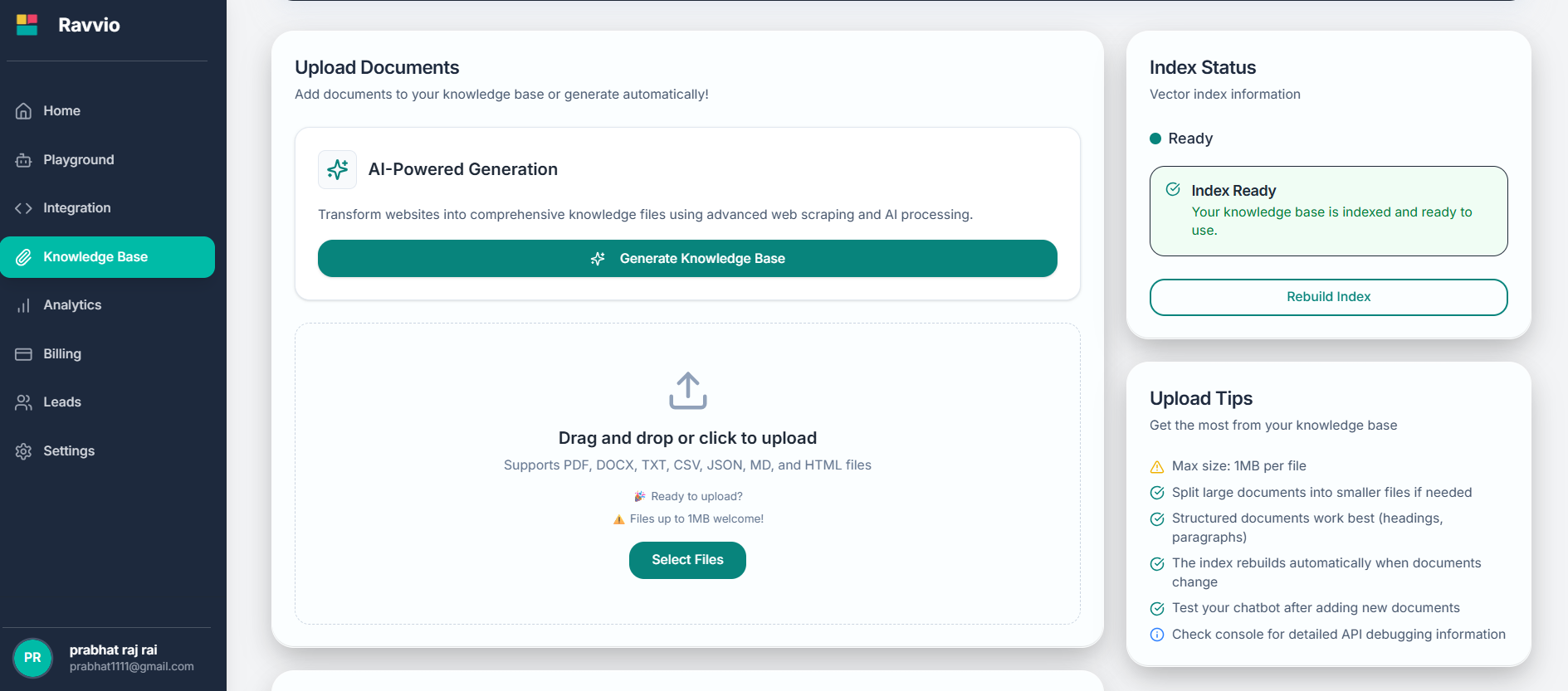
The knowledge base management system in Ravvio provides powerful tools to organize, maintain, and optimize your AI agent's training content for maximum performance and accuracy.
 ### Core Management Capabilities
Systematic organization and categorization of training materials
Real-time tracking of document processing and indexing status
Tools for improving knowledge base effectiveness and accuracy
Validation and verification of processed content quality
## Document Management Interface
### Document Library
**Overview Display:**
* Complete list of all uploaded documents
* File names, sizes, and upload dates
* Processing status indicators for each document
* Quick action buttons for individual documents
**Sorting and Filtering:**
* Sort by name, date, size, or processing status
* Filter by document type or processing state
* Search functionality for quick document location
* Batch selection for multiple document operations
**File Information:**
* Original filename and file size
* Upload timestamp and user attribution
* Document type and format identification
* Processing completion status and timestamps
**Content Preview:**
* Text extraction preview when available
* Document structure and organization insights
* Key topics and content themes identified
* Processing logs and any error notifications
**Available Operations:**
* View document processing details
* Reprocess documents if needed
* Download original files
* Remove documents from knowledge base
* Update document metadata and tags
### Processing Status Tracking
Document successfully received and queued for processing
Text and data extraction from the uploaded document format
Semantic analysis and topic identification within the document
Integration of processed content into searchable knowledge index
Document content fully available for AI agent responses
## Content Processing Features
### Automatic Text Extraction
### Core Management Capabilities
Systematic organization and categorization of training materials
Real-time tracking of document processing and indexing status
Tools for improving knowledge base effectiveness and accuracy
Validation and verification of processed content quality
## Document Management Interface
### Document Library
**Overview Display:**
* Complete list of all uploaded documents
* File names, sizes, and upload dates
* Processing status indicators for each document
* Quick action buttons for individual documents
**Sorting and Filtering:**
* Sort by name, date, size, or processing status
* Filter by document type or processing state
* Search functionality for quick document location
* Batch selection for multiple document operations
**File Information:**
* Original filename and file size
* Upload timestamp and user attribution
* Document type and format identification
* Processing completion status and timestamps
**Content Preview:**
* Text extraction preview when available
* Document structure and organization insights
* Key topics and content themes identified
* Processing logs and any error notifications
**Available Operations:**
* View document processing details
* Reprocess documents if needed
* Download original files
* Remove documents from knowledge base
* Update document metadata and tags
### Processing Status Tracking
Document successfully received and queued for processing
Text and data extraction from the uploaded document format
Semantic analysis and topic identification within the document
Integration of processed content into searchable knowledge index
Document content fully available for AI agent responses
## Content Processing Features
### Automatic Text Extraction
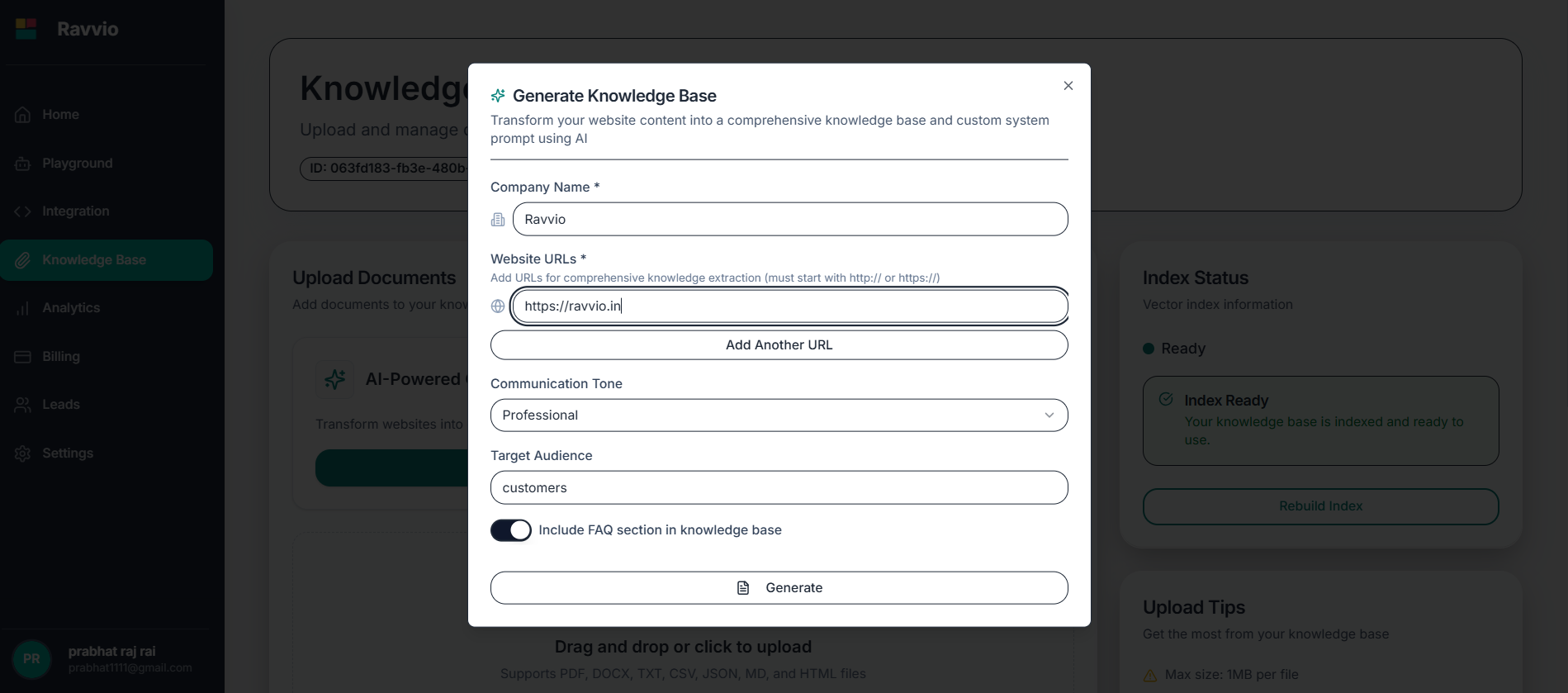 Intelligent extraction from PDF, DOCX, TXT, CSV, JSON, MD, and HTML files
Maintains document hierarchy, headings, and organizational structure
Captures titles, headers, and formatting information for context
Robust processing with error detection and recovery mechanisms
### Intelligent Content Chunking
**Smart Chunking Process:**
* Content divided into logical, meaningful sections
* Preservation of context within each chunk
* Optimal chunk sizes for AI processing efficiency
* Maintenance of relationships between related sections
**Relationship Management:**
* Links between related document sections maintained
* Hierarchical structure preserved across chunks
* Cross-references and citations tracked
* Topic continuity ensured for accurate responses
**Processing Enhancement:**
* Dynamic chunk sizing based on content complexity
* Overlap strategies to prevent information loss
* Priority weighting for important content sections
* Performance optimization for query response speed
### Semantic Indexing System
Deep semantic analysis of document content and themes
Automatic identification and categorization of key topics
Creation of connections between related concepts and information
Index optimization for fast and accurate information retrieval
Integration with existing knowledge base for enhanced accuracy
## Index Health Monitoring
### Status Indicators
**Green Indicator:**
* All documents successfully processed and indexed
* Content fully available for AI agent responses
* No processing errors or warnings
* Optimal performance and response accuracy
**Characteristics:**
* Fast query response times
* High-quality answer generation
* Complete content accessibility
* System operating at full capacity
**Yellow Indicator:**
* Documents currently being processed
* Some content may be temporarily unavailable
* Processing queue active with pending documents
* Partial knowledge base functionality
**Expected Behavior:**
* New uploads being integrated
* Temporary gaps in available information
* Gradual improvement as processing completes
* Normal system operation during updates
**Red Indicator:**
* Processing failures or system issues detected
* Some documents failed to process correctly
* Potential gaps in knowledge base coverage
* Immediate attention and resolution required
**Troubleshooting Actions:**
* Review error logs and messages
* Retry failed document processing
* Contact support for persistent issues
* Verify document formats and integrity
### Performance Metrics
Average time for document processing and index integration
Percentage of documents successfully processed without errors
Total amount of processed content available for queries
Average response time for information retrieval requests
## Content Quality Management
### Quality Assurance Features
Automatic validation of extracted text quality and completeness
Identification and handling of duplicate or redundant content
Evaluation of content relevance and usefulness for agent responses
Validation of processed content against original documents
Ongoing optimization based on usage patterns and feedback
### Content Optimization Tools
**Automatic Assessment:**
* Content scored based on relevance to your business domain
* Identification of high-value information for prioritization
* Detection of outdated or less useful content
* Recommendations for knowledge base improvements
**Coverage Assessment:**
* Identification of knowledge gaps in your content
* Analysis of frequently asked questions without answers
* Recommendations for additional content needs
* Topic coverage mapping and improvement suggestions
**Usage Insights:**
* Tracking of which content sections are most frequently accessed
* Analysis of successful vs. unsuccessful information retrieval
* Identification of content that improves response quality
* Data-driven recommendations for content optimization
## Maintenance and Updates
### Regular Maintenance Tasks
Periodic review of document relevance and accuracy
Regular optimization of search index for improved performance
Ongoing evaluation of content quality and usefulness
Continuous monitoring of system performance and response quality
### Update Management
**Document Refresh Process:**
* Replace outdated documents with current versions
* Automatic reprocessing of updated content
* Preservation of document relationships and references
* Seamless transition to updated information
**Bulk Management:**
* Multiple document upload and processing
* Batch removal of outdated content
* Mass updates to document metadata
* Bulk reprocessing for system improvements
**Change Management:**
* Tracking of document versions and updates
* Rollback capabilities for problematic changes
* Change logs and audit trails
* Impact assessment of content modifications
## Troubleshooting and Support
### Common Issues
**Typical Causes:**
* Corrupted or damaged document files
* Unsupported file formats or versions
* Documents exceeding size limitations
* Network interruptions during upload
**Resolution Steps:**
* Verify file integrity and format compatibility
* Check file size against system limits
* Retry upload with stable internet connection
* Contact support for persistent processing issues
**Potential Problems:**
* Large knowledge base affecting response times
* Index fragmentation from frequent updates
* Overloaded system during peak usage
* Network latency affecting query performance
**Optimization Strategies:**
* Regular index maintenance and optimization
* Content pruning to remove outdated information
* Strategic document organization and chunking
* Performance monitoring and proactive maintenance
### Support Resources
For technical issues with knowledge base management, contact support at [sujay@ravvio.in](mailto:sujay@ravvio.in) with detailed information about the problem and steps attempted.
**When contacting support, include:**
* Description of the specific issue encountered
* Screenshots of error messages or status indicators
* List of affected documents or processing attempts
* Timeline of when the problem began
* Steps already taken to resolve the issue
Regular knowledge base maintenance and monitoring helps prevent most issues and ensures optimal AI agent performance.
Intelligent extraction from PDF, DOCX, TXT, CSV, JSON, MD, and HTML files
Maintains document hierarchy, headings, and organizational structure
Captures titles, headers, and formatting information for context
Robust processing with error detection and recovery mechanisms
### Intelligent Content Chunking
**Smart Chunking Process:**
* Content divided into logical, meaningful sections
* Preservation of context within each chunk
* Optimal chunk sizes for AI processing efficiency
* Maintenance of relationships between related sections
**Relationship Management:**
* Links between related document sections maintained
* Hierarchical structure preserved across chunks
* Cross-references and citations tracked
* Topic continuity ensured for accurate responses
**Processing Enhancement:**
* Dynamic chunk sizing based on content complexity
* Overlap strategies to prevent information loss
* Priority weighting for important content sections
* Performance optimization for query response speed
### Semantic Indexing System
Deep semantic analysis of document content and themes
Automatic identification and categorization of key topics
Creation of connections between related concepts and information
Index optimization for fast and accurate information retrieval
Integration with existing knowledge base for enhanced accuracy
## Index Health Monitoring
### Status Indicators
**Green Indicator:**
* All documents successfully processed and indexed
* Content fully available for AI agent responses
* No processing errors or warnings
* Optimal performance and response accuracy
**Characteristics:**
* Fast query response times
* High-quality answer generation
* Complete content accessibility
* System operating at full capacity
**Yellow Indicator:**
* Documents currently being processed
* Some content may be temporarily unavailable
* Processing queue active with pending documents
* Partial knowledge base functionality
**Expected Behavior:**
* New uploads being integrated
* Temporary gaps in available information
* Gradual improvement as processing completes
* Normal system operation during updates
**Red Indicator:**
* Processing failures or system issues detected
* Some documents failed to process correctly
* Potential gaps in knowledge base coverage
* Immediate attention and resolution required
**Troubleshooting Actions:**
* Review error logs and messages
* Retry failed document processing
* Contact support for persistent issues
* Verify document formats and integrity
### Performance Metrics
Average time for document processing and index integration
Percentage of documents successfully processed without errors
Total amount of processed content available for queries
Average response time for information retrieval requests
## Content Quality Management
### Quality Assurance Features
Automatic validation of extracted text quality and completeness
Identification and handling of duplicate or redundant content
Evaluation of content relevance and usefulness for agent responses
Validation of processed content against original documents
Ongoing optimization based on usage patterns and feedback
### Content Optimization Tools
**Automatic Assessment:**
* Content scored based on relevance to your business domain
* Identification of high-value information for prioritization
* Detection of outdated or less useful content
* Recommendations for knowledge base improvements
**Coverage Assessment:**
* Identification of knowledge gaps in your content
* Analysis of frequently asked questions without answers
* Recommendations for additional content needs
* Topic coverage mapping and improvement suggestions
**Usage Insights:**
* Tracking of which content sections are most frequently accessed
* Analysis of successful vs. unsuccessful information retrieval
* Identification of content that improves response quality
* Data-driven recommendations for content optimization
## Maintenance and Updates
### Regular Maintenance Tasks
Periodic review of document relevance and accuracy
Regular optimization of search index for improved performance
Ongoing evaluation of content quality and usefulness
Continuous monitoring of system performance and response quality
### Update Management
**Document Refresh Process:**
* Replace outdated documents with current versions
* Automatic reprocessing of updated content
* Preservation of document relationships and references
* Seamless transition to updated information
**Bulk Management:**
* Multiple document upload and processing
* Batch removal of outdated content
* Mass updates to document metadata
* Bulk reprocessing for system improvements
**Change Management:**
* Tracking of document versions and updates
* Rollback capabilities for problematic changes
* Change logs and audit trails
* Impact assessment of content modifications
## Troubleshooting and Support
### Common Issues
**Typical Causes:**
* Corrupted or damaged document files
* Unsupported file formats or versions
* Documents exceeding size limitations
* Network interruptions during upload
**Resolution Steps:**
* Verify file integrity and format compatibility
* Check file size against system limits
* Retry upload with stable internet connection
* Contact support for persistent processing issues
**Potential Problems:**
* Large knowledge base affecting response times
* Index fragmentation from frequent updates
* Overloaded system during peak usage
* Network latency affecting query performance
**Optimization Strategies:**
* Regular index maintenance and optimization
* Content pruning to remove outdated information
* Strategic document organization and chunking
* Performance monitoring and proactive maintenance
### Support Resources
For technical issues with knowledge base management, contact support at [sujay@ravvio.in](mailto:sujay@ravvio.in) with detailed information about the problem and steps attempted.
**When contacting support, include:**
* Description of the specific issue encountered
* Screenshots of error messages or status indicators
* List of affected documents or processing attempts
* Timeline of when the problem began
* Steps already taken to resolve the issue
Regular knowledge base maintenance and monitoring helps prevent most issues and ensures optimal AI agent performance.