> ## Documentation Index
> Fetch the complete documentation index at: https://docs.ravvio.in/llms.txt
> Use this file to discover all available pages before exploring further.

# Integration Methods

> Complete guide to deploying your AI chatbot on websites using multiple integration approaches

## Integration Overview

Ravvio provides multiple integration methods to deploy your AI chatbot on any website, from simple script tags to advanced iframe embedding, ensuring compatibility with all major platforms and content management systems.
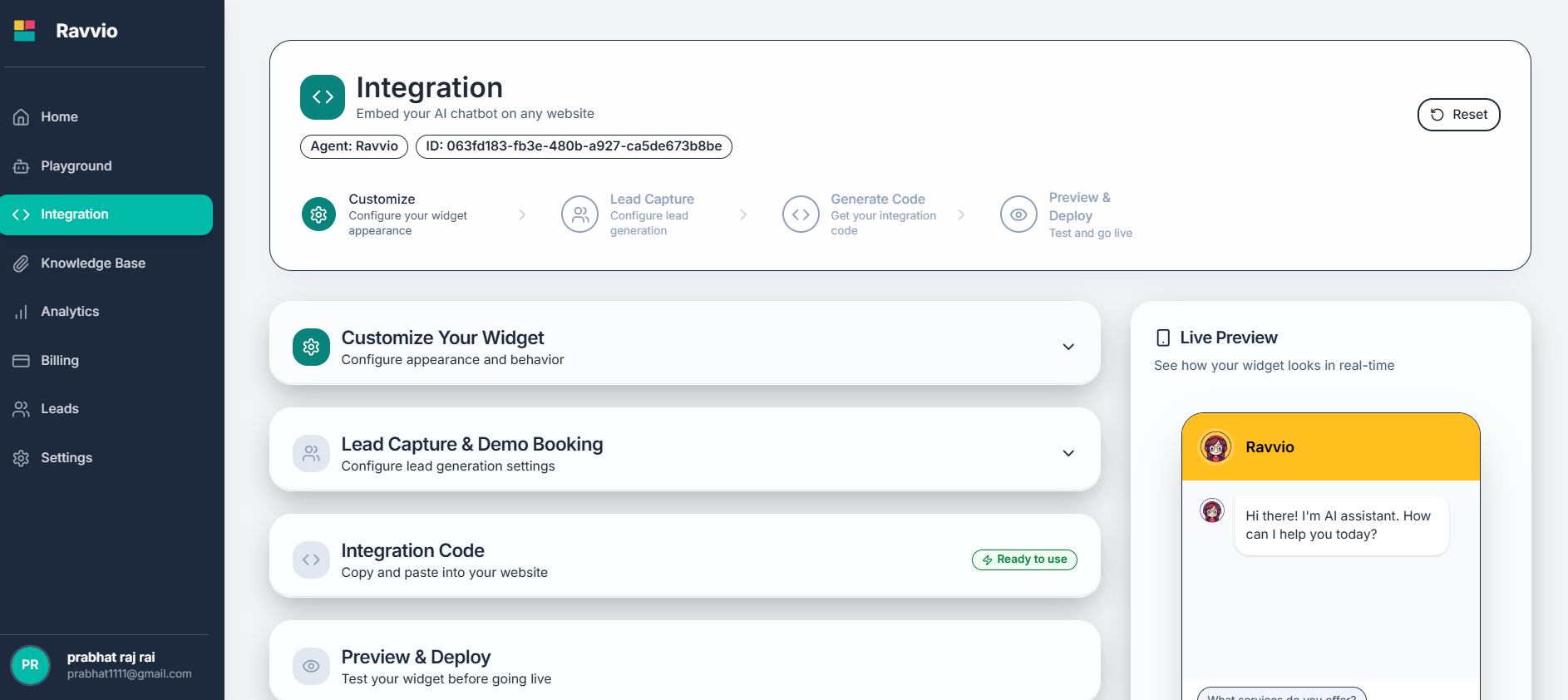
<img src="https://mintcdn.com/ravvio/_L8X6ofEXB51J7A7/images/integration-methods-overview.png?fit=max&auto=format&n=_L8X6ofEXB51J7A7&q=85&s=74e167248c1750ccee35705a93460375" alt="Overview of different integration methods" width="1886" height="842" data-path="images/integration-methods-overview.png" />

### Available Integration Methods

<CardGroup cols={3}>
  <Card title="JavaScript Widget" icon="code">
    **Recommended**

    Dynamic, feature-rich chatbot with real-time configuration updates
  </Card>

  <Card title="HTML/CSS Bubble" icon="circle">
    **Lightweight**

    Pure HTML/CSS solution with minimal resource requirements
  </Card>

  <Card title="Direct Embed URL" icon="external-link">
    **Simple**

    Direct iframe integration for quick deployment
  </Card>
</CardGroup>

## JavaScript Widget (Recommended)

### Key Features
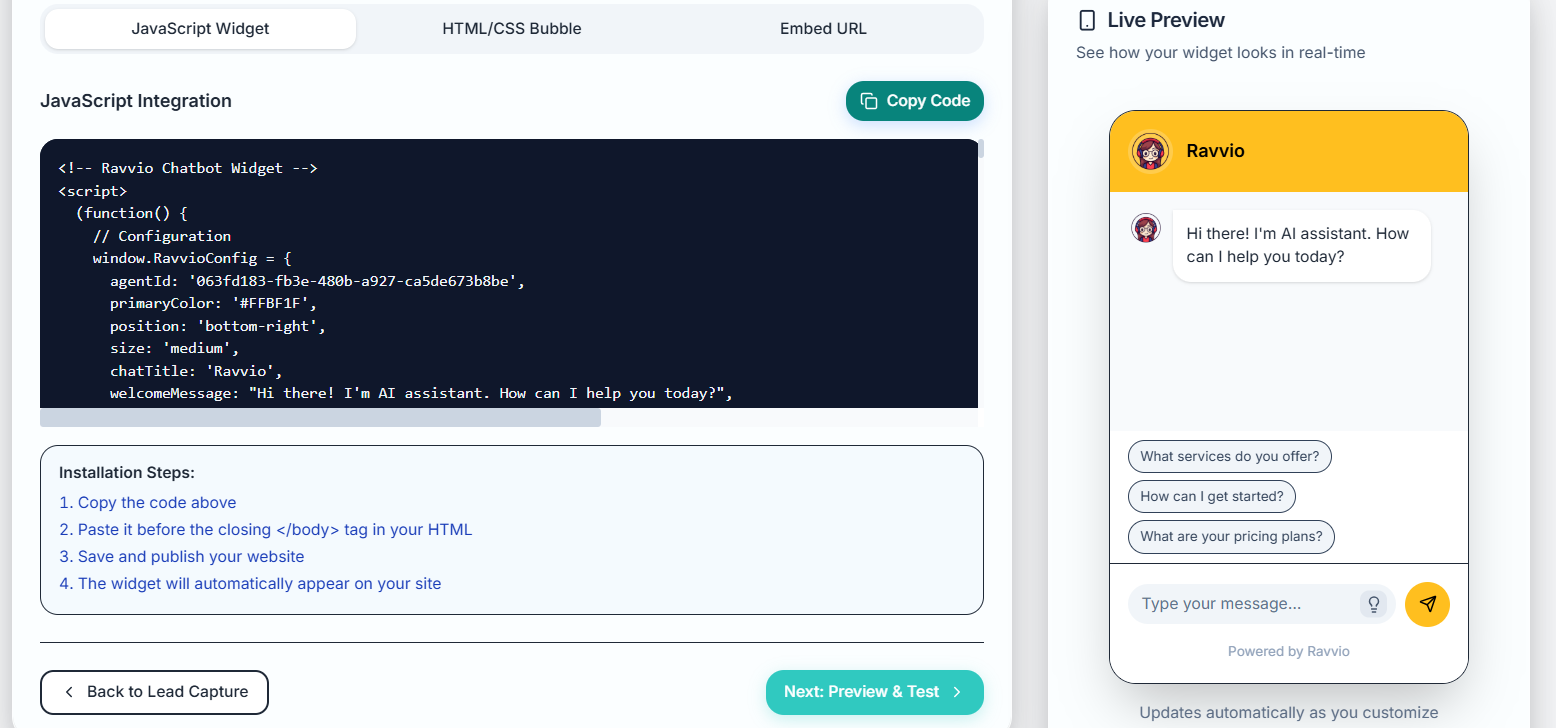
<img src="https://mintcdn.com/ravvio/_L8X6ofEXB51J7A7/images/javascript-widget-setup.png?fit=max&auto=format&n=_L8X6ofEXB51J7A7&q=85&s=70f3ac273a3512a86e567e634165362d" alt="JavaScript widget configuration and setup" width="1556" height="728" data-path="images/javascript-widget-setup.png" />

<AccordionGroup>
  <Accordion title="Dynamic Configuration">
    **Real-Time Updates:**

    * Configuration changes reflect immediately without code updates
    * Synchronized with dashboard settings and customizations
    * Automatic feature updates and platform improvements
    * Live customization without website redeployment

    **Benefits:**

    * No need to update website code for configuration changes
    * Instant access to new features and improvements
    * Centralized management through Ravvio dashboard
    * Reduced maintenance overhead and technical complexity
  </Accordion>

  <Accordion title="Advanced Features">
    **Enhanced Capabilities:**

    * Welcome popups with customizable messages and branding
    * Suggested questions for improved user engagement
    * Lead capture forms with intelligent email collection
    * Demo booking integration with Calendly and other platforms
    * Mobile-responsive design with touch optimization

    **User Experience:**

    * Smooth animations and professional appearance
    * Context-aware messaging and personalization
    * Accessibility compliance and screen reader support
    * Cross-browser compatibility and performance optimization
  </Accordion>

  <Accordion title="Easy Installation">
    **Simple Implementation:**

    * Single script tag implementation process
    * Automatic loading and initialization handling
    * No additional dependencies or libraries required
    * Compatible with all modern browsers and devices

    **Installation Process:**

    * Copy integration code from Ravvio dashboard
    * Paste code before closing body tag on website
    * Widget automatically loads and becomes functional
    * No additional configuration or setup required
  </Accordion>
</AccordionGroup>

### Implementation Process

<Steps>
  <Step title="Generate Integration Code">
    **Code Generation:**

    * Access integration settings in Ravvio dashboard
    * Configure widget appearance and behavior preferences
    * Generate custom integration code with your agent ID
    * Copy complete JavaScript implementation code
  </Step>

  <Step title="Install on Website">
    **Code Placement:**

    * Locate closing `</body>` tag in website HTML
    * Paste Ravvio script immediately before closing body tag
    * Save changes and deploy to live website
    * Verify widget appears and functions correctly
  </Step>

  <Step title="Test and Optimize">
    **Validation:**

    * Test widget functionality across different browsers
    * Verify mobile responsiveness and touch interactions
    * Confirm lead capture and demo booking integration
    * Monitor performance and user engagement metrics
  </Step>
</Steps>

## HTML/CSS Bubble

<img src="https://mintcdn.com/ravvio/_L8X6ofEXB51J7A7/images/html-css-bubble-setup.png?fit=max&auto=format&n=_L8X6ofEXB51J7A7&q=85&s=a3faaf5611b4a98819fb0a67357abf6f" alt="HTML/CSS widget configuration and setup" width="1574" height="738" data-path="images/html-css-bubble-setup.png" />

### Lightweight Solution

<CardGroup cols={2}>
  <Card title="Minimal Dependencies" icon="feather">
    **Pure Implementation:**

    * No JavaScript framework dependencies
    * Minimal resource requirements and fast loading
    * Pure HTML/CSS with minimal JavaScript
    * Optimal for performance-critical websites
  </Card>

  <Card title="Fast Loading" icon="zap">
    **Performance Benefits:**

    * Minimal resource consumption and bandwidth usage
    * Fast initialization and immediate availability
    * Reduced impact on page loading speed
    * Optimal for mobile and slow network connections
  </Card>
</CardGroup>

### Browser Compatibility

<AccordionGroup>
  <Accordion title="Universal Compatibility">
    **Wide Browser Support:**

    * Works on all modern browsers including Chrome, Firefox, Safari, Edge
    * Compatible with older browser versions for legacy support
    * Consistent appearance and functionality across platforms
    * Graceful degradation for unsupported features

    **Cross-Platform Support:**

    * Desktop, tablet, and mobile device compatibility
    * iOS and Android operating system support
    * Responsive design adaptation for different screen sizes
    * Touch interface optimization for mobile devices
  </Accordion>

  <Accordion title="Customization Options">
    **Styling Flexibility:**

    * Easy CSS customization for brand alignment
    * Customizable colors, fonts, and visual elements
    * Flexible positioning and sizing options
    * Integration with existing website design systems

    **Implementation Benefits:**

    * Simple HTML structure for easy modification
    * CSS-based styling for designer-friendly customization
    * Minimal JavaScript for enhanced functionality
    * Clean code structure for maintainability
  </Accordion>
</AccordionGroup>

## Direct Embed URL

<img src="https://mintcdn.com/ravvio/_L8X6ofEXB51J7A7/images/embed-url.png?fit=max&auto=format&n=_L8X6ofEXB51J7A7&q=85&s=fe3993e6a28ed84a45ae6878825e6023" alt="Direct Embed URL" width="1606" height="660" data-path="images/embed-url.png" />

### iFrame Integration

<CardGroup cols={2}>
  <Card title="Simple Integration" icon="square">
    **Straightforward Implementation:**

    * Direct website embedding using iframe element
    * No JavaScript configuration or setup required
    * Immediate functionality with minimal code
    * Perfect for quick testing and prototyping
  </Card>

  <Card title="Sandboxed Security" icon="shield">
    **Security Benefits:**

    * Isolated execution environment for enhanced security
    * Protection from potential JavaScript conflicts
    * Secure data handling and privacy protection
    * Minimal impact on parent website security
  </Card>
</CardGroup>

### URL Parameters and Customization

<AccordionGroup>
  <Accordion title="Customization Through Query Strings">
    **Parameter Options:**

    * Primary color customization through URL parameters
    * Agent ID specification for correct chatbot connection
    * Position and sizing configuration through parameters
    * Welcome message and behavior customization options
  </Accordion>

  <Accordion title="Responsive Design">
    **Flexible Sizing:**

    * Responsive iframe dimensions for different screen sizes
    * Automatic scaling and layout adaptation
    * Mobile-optimized display and touch interactions
    * Desktop and tablet compatibility with optimal sizing
  </Accordion>
</AccordionGroup>

## Method Comparison and Selection

### Feature Comparison

| Feature              | JavaScript Widget | HTML/CSS Bubble | Direct Embed |
| -------------------- | ----------------- | --------------- | ------------ |
| **Setup Complexity** | Simple            | Moderate        | Very Simple  |
| **Customization**    | Extensive         | High            | Limited      |
| **Performance**      | Optimized         | Lightweight     | Fast Loading |
| **Features**         | Full Suite        | Basic           | Standard     |
| **Updates**          | Automatic         | Manual          | Automatic    |
| **Browser Support**  | Modern            | Universal       | All Browsers |

### Selection Criteria

<CardGroup cols={2}>
  <Card title="Choose JavaScript Widget For:" icon="check">
    **Optimal Scenarios:**

    * Full feature functionality requirements
    * Dynamic configuration and real-time updates
    * Advanced lead capture and demo booking
    * Professional appearance and user experience
    * Regular feature updates and improvements
  </Card>

  <Card title="Choose Alternatives For:" icon="info">
    **Specific Use Cases:**

    * **HTML/CSS Bubble**: Performance-critical websites, custom styling needs
    * **Direct Embed**: Quick testing, simple integration, legacy browser support
    * **JavaScript Widget**: Most comprehensive solution for full functionality
  </Card>
</CardGroup>

## Platform-Specific Integration

### Content Management Systems

<AccordionGroup>
  <Accordion title="WordPress Integration">
    **Implementation Methods:**

    * Add code directly to theme's footer.php file
    * Use WordPress plugin for easier management and updates
    * Widget placement through WordPress admin dashboard
    * Custom post type and page-specific integration

    **Best Practices:**

    * Test compatibility with active plugins and themes
    * Ensure proper caching plugin integration
    * Verify mobile responsiveness across different themes
    * Monitor performance impact on page loading speeds
  </Accordion>

  <Accordion title="E-commerce Platforms">
    **Shopify Integration:**

    * Add code to theme.liquid file before closing body tag
    * Product page specific implementation for targeted support
    * Integration with Shopify checkout and customer data
    * Multi-language store support and localization

    **WooCommerce Integration:**

    * WordPress-based implementation with e-commerce optimization
    * Product inquiry and support integration
    * Cart abandonment recovery and customer support
    * Order status inquiry and shipping information
  </Accordion>

  <Accordion title="Website Builders">
    **Wix Integration:**

    * Use HTML embed component in site footer
    * Drag-and-drop widget placement and customization
    * Mobile editor optimization and responsive design
    * Integration with Wix contact forms and CRM

    **Squarespace Integration:**

    * Add code to site-wide footer code injection
    * Template-specific implementation and customization
    * Mobile optimization and responsive design testing
    * Integration with Squarespace commerce and forms
  </Accordion>
</AccordionGroup>

## Integration Best Practices

### Performance Optimization

<Steps>
  <Step title="Loading Speed Optimization">
    **Performance Strategies:**

    * Implement asynchronous loading to prevent page blocking
    * Use CDN delivery for optimal resource loading speed
    * Minimize HTTP requests and optimize resource bundling
    * Implement proper caching strategies and browser optimization
  </Step>

  <Step title="Resource Management">
    **Efficiency Measures:**

    * Monitor and optimize JavaScript execution time
    * Minimize CSS and image resource usage
    * Implement lazy loading for non-critical resources
    * Optimize for mobile networks and slower connections
  </Step>

  <Step title="User Experience Optimization">
    **UX Best Practices:**

    * Ensure widget doesn't interfere with website functionality
    * Provide clear visual feedback for user interactions
    * Optimize placement for maximum engagement without obstruction
    * Test user flows and optimize for conversion goals
  </Step>
</Steps>

### Security Considerations

<CardGroup cols={2}>
  <Card title="Data Protection" icon="shield">
    **Security Measures:**

    * HTTPS implementation for secure data transmission
    * Data encryption in transit and at rest
    * Compliance with privacy regulations (GDPR, CCPA)
    * Secure API authentication and access control
  </Card>

  <Card title="Website Security" icon="lock">
    **Integration Security:**

    * Content Security Policy (CSP) compatibility
    * Cross-site scripting (XSS) protection
    * Secure iframe implementation and sandboxing
    * Regular security updates and vulnerability patching
  </Card>
</CardGroup>

## Troubleshooting Integration Issues

### Common Problems and Solutions

<Steps>
  <Step title="Widget Not Loading">
    **Diagnostic Steps:**

    * Verify correct script placement before closing body tag
    * Check browser developer console for JavaScript errors
    * Confirm agent ID is correct in integration code
    * Test with different browsers and disable browser extensions
  </Step>

  <Step title="Functionality Issues">
    **Resolution Process:**

    * Validate internet connectivity and API accessibility
    * Check for JavaScript conflicts with other website scripts
    * Verify configuration settings and parameters
    * Test in isolation to identify conflicting elements
  </Step>

  <Step title="Performance Problems">
    **Optimization Actions:**

    * Monitor impact on page loading speed and optimize
    * Check for resource conflicts and loading delays
    * Optimize integration method for better performance
    * Consider alternative integration approach if needed
  </Step>
</Steps>

<Note>
  **Integration Method Selection**: Choose the integration method that best fits your technical requirements, performance needs, and maintenance capabilities.
</Note>

<Tip>
  **Testing Strategy**: Always test your chosen integration method thoroughly across different browsers and devices before deploying to your live website.
</Tip>

<Warning>
  **Script Placement**: Incorrect script placement is the most common integration issue. Always place integration code before the closing body tag, never in the head section.
</Warning>
