> ## Documentation Index
> Fetch the complete documentation index at: https://docs.ravvio.in/llms.txt
> Use this file to discover all available pages before exploring further.
# Profile Management
> Managing your account information, preferences, and security settings
## Profile Overview
Your Ravvio profile contains all account information, preferences, and security settings necessary for platform operation and personalization.
### Accessing Profile Settings
Navigate to your profile through:
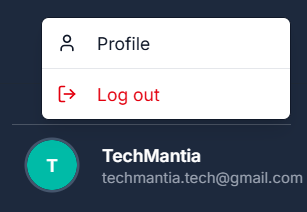 Click your profile icon or name in the top navigation bar
Select "Profile Settings" from the dropdown menu
Access comprehensive profile management interface
## Account Information Management
### Personal Details
Click your profile icon or name in the top navigation bar
Select "Profile Settings" from the dropdown menu
Access comprehensive profile management interface
## Account Information Management
### Personal Details
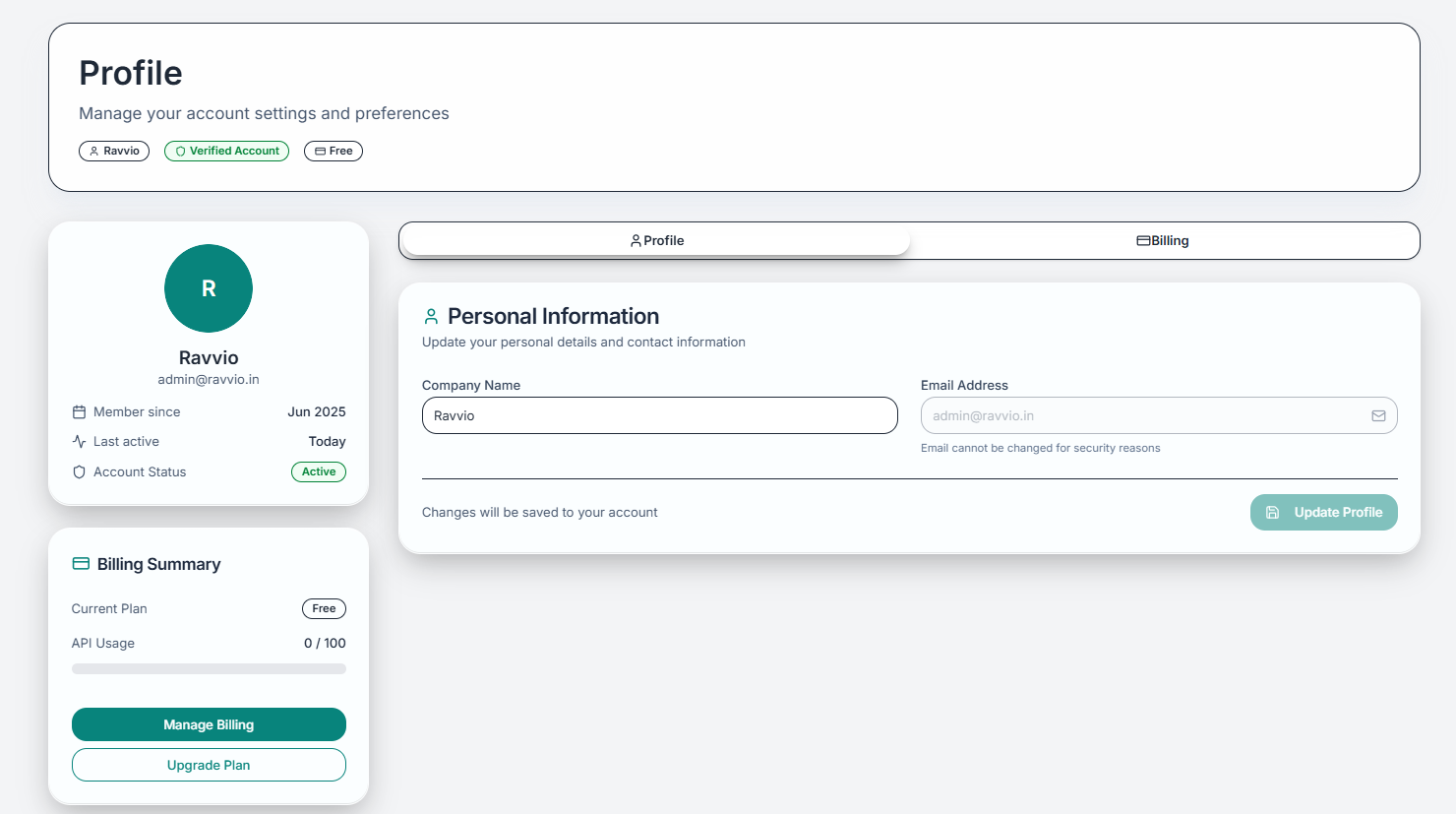 Name, email address, and contact details for account identification
Business details and branding information for customization
Communication settings and notification preferences
Password management and authentication options
### Editable Profile Fields
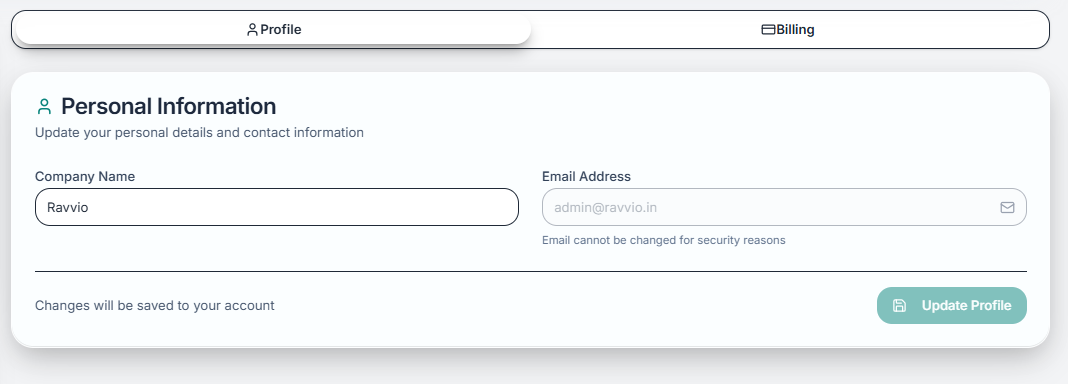
* **Full Name**: Your display name throughout the platform
* **Email Address**: Primary contact and login credential
* **Company Name**: Business name for personalization and billing
* **Phone Number**: Optional contact information for support
Name, email address, and contact details for account identification
Business details and branding information for customization
Communication settings and notification preferences
Password management and authentication options
### Editable Profile Fields
* **Full Name**: Your display name throughout the platform
* **Email Address**: Primary contact and login credential
* **Company Name**: Business name for personalization and billing
* **Phone Number**: Optional contact information for support
 * **Company Website**: Used for context and integration
* **Industry**: Helps customize AI recommendations
* **Company Size**: Influences feature recommendations
* **Role/Title**: Your position for platform personalization
* **Time Zone**: For scheduling and timestamp display
* **Language**: Platform language preference
* **Date Format**: Regional date display preferences
* **Currency**: For billing and pricing display
Email address changes require verification. Ensure access to both old and new email addresses before making changes.
## Email Preferences
### Notification Settings
Control what communications you receive from Ravvio:
| Notification Type | Description | Default Setting |
| ---------------------- | ----------------------------------------- | --------------- |
| **Usage Alerts** | Credit consumption warnings and limits | Enabled |
| **System Updates** | Platform improvements and new features | Enabled |
| **Lead Notifications** | New lead capture alerts | Enabled |
| **Billing Reminders** | Payment and renewal notices | Enabled |
| **Security Alerts** | Account access and security notifications | Always On |
Security alerts cannot be disabled for account protection, but all other notification types can be customized.
### Communication Frequency
* Critical security alerts
* System outages or maintenance
* Failed payment notifications
* Urgent account issues
* Lead capture reports
* Usage statistics summaries
* Performance highlights
* Scheduled maintenance notices
* Analytics summaries
* Feature usage insights
* Optimization recommendations
* Platform updates
## Security Settings
### Password Management
Enter your existing password for security verification
Create a new password meeting security requirements
Re-enter new password to prevent typing errors
Apply password change across all sessions
### Authentication Options
Traditional email and password login method
Single sign-on using Google account credentials
#### Managing Multiple Auth Methods
* **Primary Method**: Set your preferred login approach
* **Backup Access**: Maintain alternative login options
* **Method Testing**: Verify all authentication methods work properly
* **Security Review**: Regularly assess authentication security
Maintaining both authentication methods provides backup access and increased convenience.
## Account Status Information
### Subscription Details
View comprehensive account status information:
* **Company Website**: Used for context and integration
* **Industry**: Helps customize AI recommendations
* **Company Size**: Influences feature recommendations
* **Role/Title**: Your position for platform personalization
* **Time Zone**: For scheduling and timestamp display
* **Language**: Platform language preference
* **Date Format**: Regional date display preferences
* **Currency**: For billing and pricing display
Email address changes require verification. Ensure access to both old and new email addresses before making changes.
## Email Preferences
### Notification Settings
Control what communications you receive from Ravvio:
| Notification Type | Description | Default Setting |
| ---------------------- | ----------------------------------------- | --------------- |
| **Usage Alerts** | Credit consumption warnings and limits | Enabled |
| **System Updates** | Platform improvements and new features | Enabled |
| **Lead Notifications** | New lead capture alerts | Enabled |
| **Billing Reminders** | Payment and renewal notices | Enabled |
| **Security Alerts** | Account access and security notifications | Always On |
Security alerts cannot be disabled for account protection, but all other notification types can be customized.
### Communication Frequency
* Critical security alerts
* System outages or maintenance
* Failed payment notifications
* Urgent account issues
* Lead capture reports
* Usage statistics summaries
* Performance highlights
* Scheduled maintenance notices
* Analytics summaries
* Feature usage insights
* Optimization recommendations
* Platform updates
## Security Settings
### Password Management
Enter your existing password for security verification
Create a new password meeting security requirements
Re-enter new password to prevent typing errors
Apply password change across all sessions
### Authentication Options
Traditional email and password login method
Single sign-on using Google account credentials
#### Managing Multiple Auth Methods
* **Primary Method**: Set your preferred login approach
* **Backup Access**: Maintain alternative login options
* **Method Testing**: Verify all authentication methods work properly
* **Security Review**: Regularly assess authentication security
Maintaining both authentication methods provides backup access and increased convenience.
## Account Status Information
### Subscription Details
View comprehensive account status information:
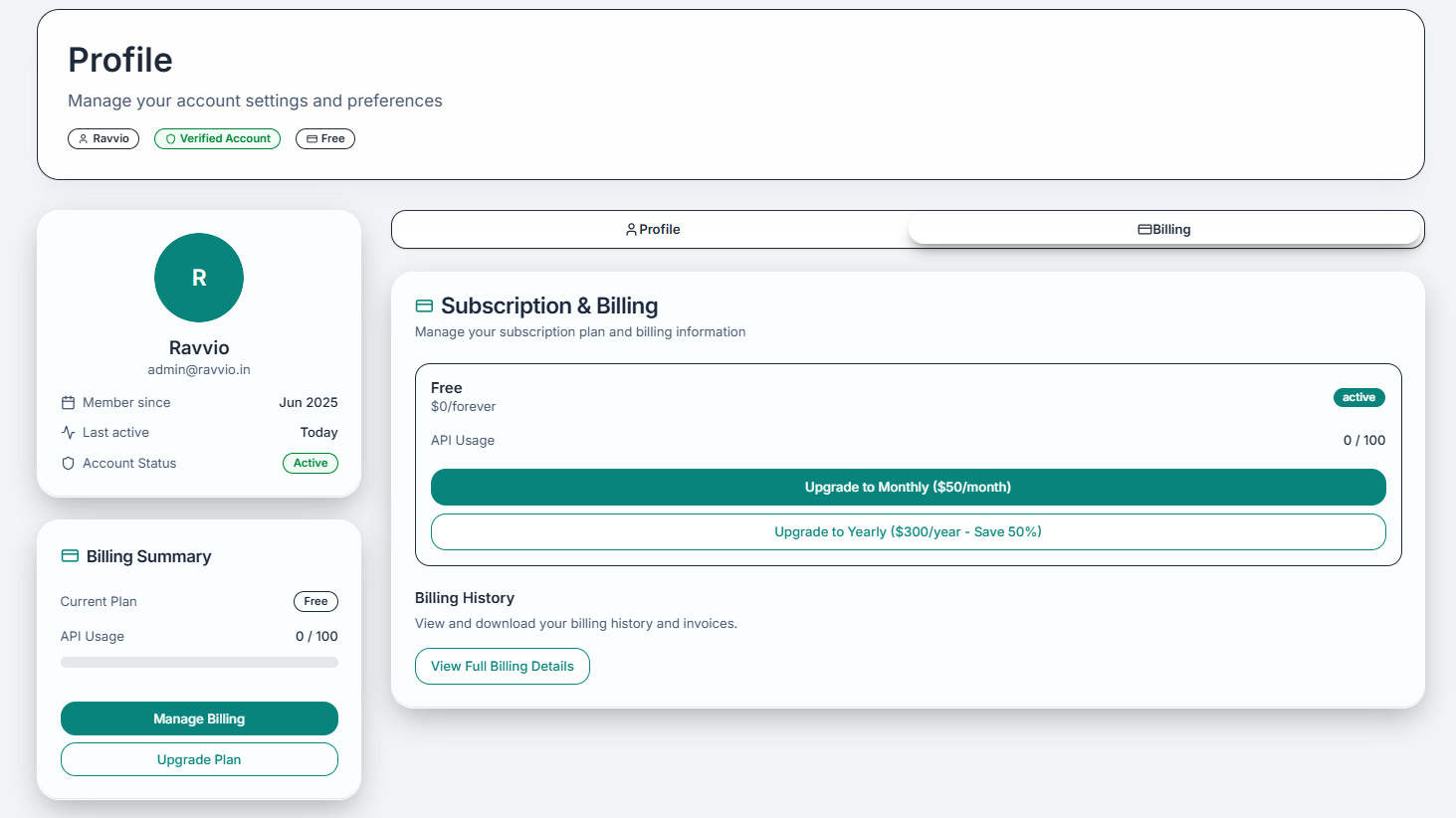 * Plan name and features
* Billing cycle and next payment
* Credit allowance and usage
* Plan change options
* Current credit consumption
* Historical usage patterns
* Remaining credit balance
* Usage trend analysis
* Available tools and capabilities
* Plan-specific limitations
* Upgrade benefits
* Feature comparison
### Support Level Information
Your support level depends on subscription plan:
| Plan Level | Support Features | Response Time |
| --------------- | -------------------------------------- | ------------- |
| **Free** | Community support, documentation | Best effort |
| **Pro Monthly** | Priority email support, extended hours | 24 hours |
| **Pro Yearly** | Priority support, phone consultation | 12 hours |
Contact support at [sujay@ravvio.in](mailto:sujay@ravvio.in) if you have questions about account deletion or data retention policies.
## Troubleshooting Profile Issues
### Common Profile Problems
Ensure new email address is valid and accessible for verification
Verify current password is correct and new password meets requirements
Check browser settings and try clearing cache before attempting again
Ensure image file is under size limit and in supported format (JPG, PNG)
### Getting Profile Help
For profile-related assistance:
* **Email Support**: [sujay@ravvio.in](mailto:sujay@ravvio.in)
* **Include Details**: Specific error messages and steps attempted
* **Response Time**: Usually within 24 hours
* **Account Verification**: May require account verification for security
* Plan name and features
* Billing cycle and next payment
* Credit allowance and usage
* Plan change options
* Current credit consumption
* Historical usage patterns
* Remaining credit balance
* Usage trend analysis
* Available tools and capabilities
* Plan-specific limitations
* Upgrade benefits
* Feature comparison
### Support Level Information
Your support level depends on subscription plan:
| Plan Level | Support Features | Response Time |
| --------------- | -------------------------------------- | ------------- |
| **Free** | Community support, documentation | Best effort |
| **Pro Monthly** | Priority email support, extended hours | 24 hours |
| **Pro Yearly** | Priority support, phone consultation | 12 hours |
Contact support at [sujay@ravvio.in](mailto:sujay@ravvio.in) if you have questions about account deletion or data retention policies.
## Troubleshooting Profile Issues
### Common Profile Problems
Ensure new email address is valid and accessible for verification
Verify current password is correct and new password meets requirements
Check browser settings and try clearing cache before attempting again
Ensure image file is under size limit and in supported format (JPG, PNG)
### Getting Profile Help
For profile-related assistance:
* **Email Support**: [sujay@ravvio.in](mailto:sujay@ravvio.in)
* **Include Details**: Specific error messages and steps attempted
* **Response Time**: Usually within 24 hours
* **Account Verification**: May require account verification for security