> ## Documentation Index
> Fetch the complete documentation index at: https://docs.ravvio.in/llms.txt
> Use this file to discover all available pages before exploring further.
# Password Recovery
> Complete guide to resetting your password and regaining access to your Ravvio account
## Password Recovery Overview
Ravvio provides a secure password recovery system that allows you to regain access to your account through email verification and secure token-based password reset.
 ### When You Need Password Recovery
**Common Scenarios:**
* Cannot remember current password
* Haven't accessed account in extended period
* Password may have been compromised
* Need to update to more secure password
**Security Situations:**
* Suspect account compromise
* Lost password manager access
* Changed email but need password reset
* Multiple failed login attempts
## Password Reset Process
### Step-by-Step Recovery
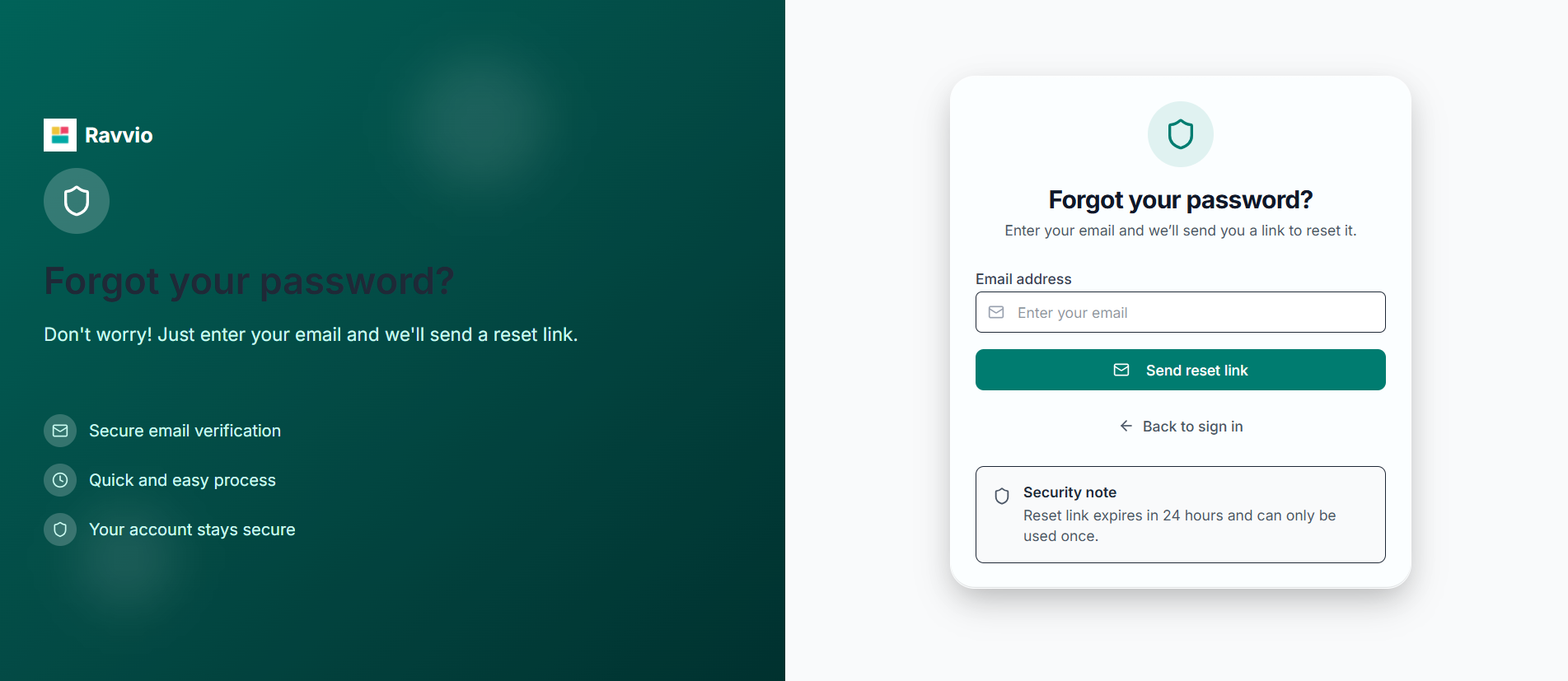
**Access Reset Form:**
* Navigate to Ravvio login page
* Click "Forgot your password?" link below login form
* Enter email address associated with your account
* Submit password reset request
### When You Need Password Recovery
**Common Scenarios:**
* Cannot remember current password
* Haven't accessed account in extended period
* Password may have been compromised
* Need to update to more secure password
**Security Situations:**
* Suspect account compromise
* Lost password manager access
* Changed email but need password reset
* Multiple failed login attempts
## Password Reset Process
### Step-by-Step Recovery
**Access Reset Form:**
* Navigate to Ravvio login page
* Click "Forgot your password?" link below login form
* Enter email address associated with your account
* Submit password reset request
 **Backend Validation:**
* System checks if account exists with provided email
* Validates account was created with email (not Google OAuth)
* Cleans up any existing password reset tokens
* Generates secure reset token with 1-hour expiration
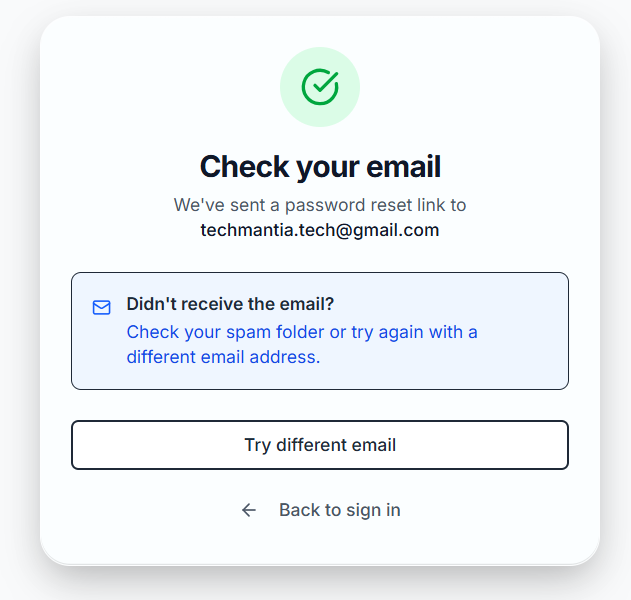
**Secure Email Sent:**
* Professional password reset email delivered to inbox
* Contains secure reset link with unique token
* Clear instructions for completing password reset
* 1-hour expiration notice for security
**Backend Validation:**
* System checks if account exists with provided email
* Validates account was created with email (not Google OAuth)
* Cleans up any existing password reset tokens
* Generates secure reset token with 1-hour expiration
**Secure Email Sent:**
* Professional password reset email delivered to inbox
* Contains secure reset link with unique token
* Clear instructions for completing password reset
* 1-hour expiration notice for security
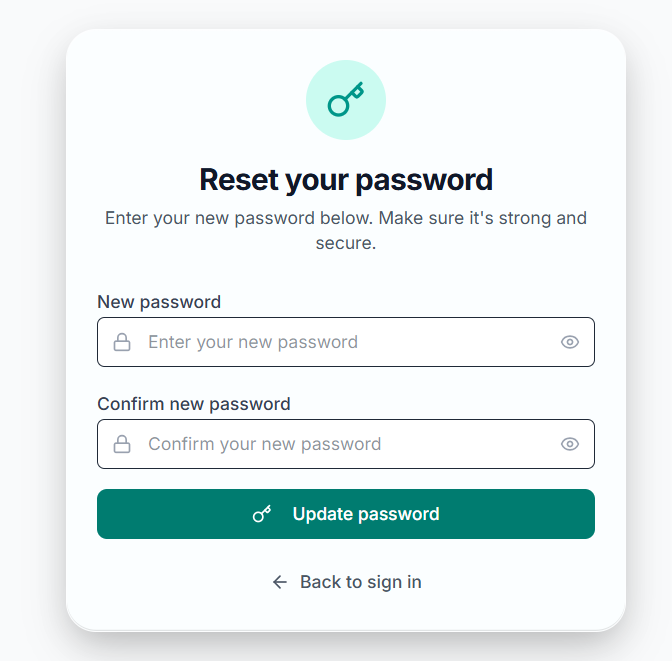
 **Set New Password:**
* Click secure reset link in email
* Enter new secure password
* Confirm password matches requirements
* Submit to complete reset process
**Set New Password:**
* Click secure reset link in email
* Enter new secure password
* Confirm password matches requirements
* Submit to complete reset process
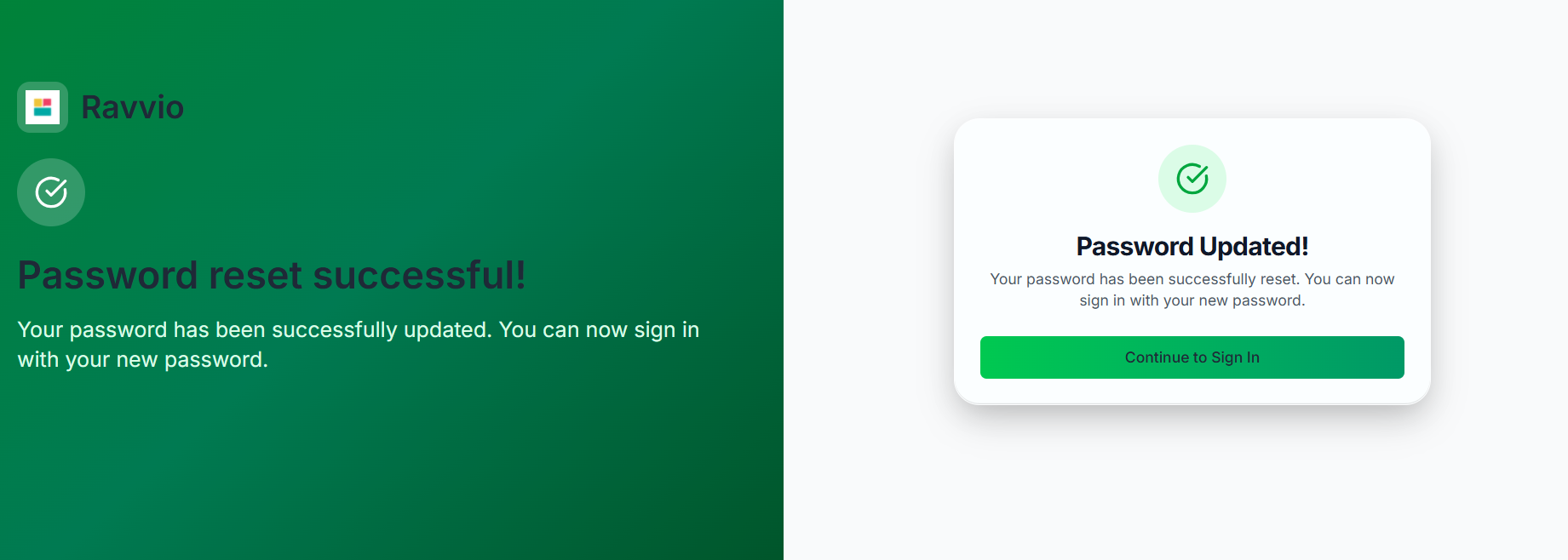
 **Success Message:**
* Password successfully updated
* Confirmation message displayed
* Automatic redirect to login page
* Account ready for immediate access
**Success Message:**
* Password successfully updated
* Confirmation message displayed
* Automatic redirect to login page
* Account ready for immediate access
 ### Security Features
**Privacy Security:**
* Same success message regardless of email existence
* Standard response: "If an account with that email exists, we have sent a password reset link"
* Prevents malicious users from discovering valid email addresses
* Consistent response timing regardless of account status
**User Protection:**
* No indication whether email is registered or not
* Protection against account discovery attacks
* Maintains user privacy and security
* Industry-standard security practice implementation
**Secure Reset Tokens:**
* Cryptographically secure random token generation
* SHA-256 hashed token storage in database
* One-hour expiration time for security
* Single-use tokens that expire after successful reset
**Token Management:**
* Previous tokens automatically invalidated
* Expired tokens cleaned up automatically
* Secure token validation during reset
* Protection against token replay attacks
## Google Account Considerations
### OAuth Users
**Special Handling:**
* Accounts created with Google OAuth cannot use password reset
* Clear message: "This account was created with Google. Please use Google sign-in instead."
* Prevents confusion for OAuth-only users
* Maintains account security integrity
**Recommended Solution:**
* Use "Continue with Google" option on login page
* Access account through Google authentication
* No password required for Google OAuth accounts
* Secure authentication through trusted provider
### Account Type Detection
**System Checks:**
* Determines if account was created with Google OAuth
* Prevents password reset for OAuth-only accounts
* Provides appropriate guidance for each account type
* Maintains security boundaries between authentication methods
**Clear Instructions:**
* Specific messages for Google users
* Direction to use appropriate authentication method
* No password creation/reset for OAuth accounts
* Maintains account security and user experience
## Password Reset Email
### Email Content and Features
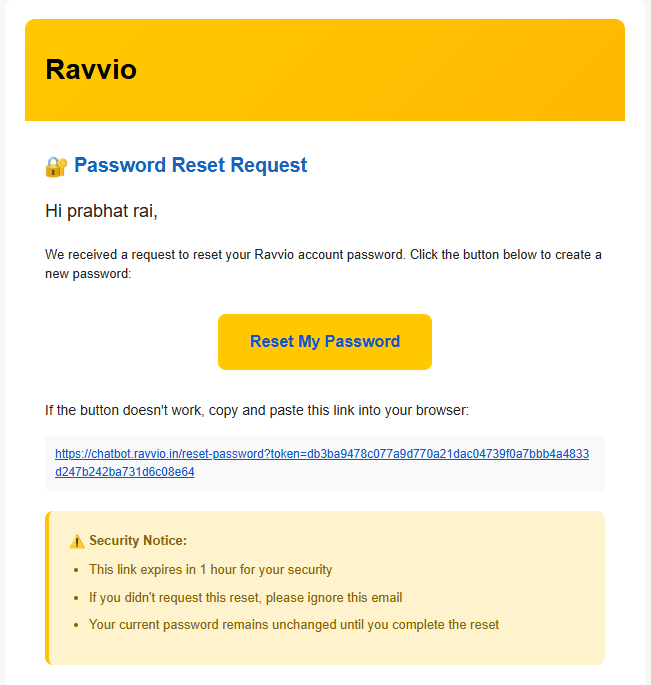
**Email Components:**
* Personalized greeting with user's name
* Clear explanation of password reset request
* Prominent reset button with secure link
* 1-hour expiration notice for security awareness
**Reset Link Details:**
* Unique secure token embedded in URL
* Direct link to password reset form
* Clear expiration time (1 hour from generation)
* Security notice about request legitimacy
**Clear Guidance:**
* Step-by-step instructions for completing reset
* Password requirements and security tips
* Contact information if assistance needed
* Warning about link expiration timing
### Email Delivery
**Email Service:**
* Professional email delivery through notification service
* High deliverability rate with proper authentication
* Branded email templates matching platform design
* Immediate delivery after reset request
**Delivery Features:**
* HTML email with professional formatting
* Mobile-responsive design for all devices
* Clear call-to-action button for reset link
* Fallback plain text for compatibility
**Common Issues:**
* Check spam/junk folder for reset email
* Verify correct email address was entered
* Allow up to 10 minutes for email delivery
* Corporate firewalls may delay delivery
## Setting New Password
### Password Requirements
**Password Criteria:**
* Minimum length requirements enforced
* Strong password recommendations provided
* Secure password hashing with bcrypt
* No plain text storage of passwords
**Recommended Approach:**
* Use unique password not used elsewhere
* Consider password manager for generation
* Include mix of letters, numbers, symbols
* Avoid personal information in password
### Reset Completion
**Reset Process:**
* New password securely hashed and stored
* Previous password immediately invalidated
* Reset token marked as used and expired
* User can immediately login with new password
**Confirmation Process:**
* Success message displayed after reset
* Automatic redirect to login page
* Password change confirmation email sent
* Account activity logged for security
**Automatic Security Measures:**
* Password change confirmation email sent
* Account activity timestamp updated
* Previous sessions may be invalidated
* Security log updated with reset activity
## Troubleshooting Password Recovery
### Common Issues and Solutions
**Troubleshooting Actions:**
* Check spam/junk folder thoroughly
* Verify correct email address was entered
* Wait up to 10-15 minutes for delivery
* Try requesting reset again if needed
* Contact support if email still not received
**Resolution Steps:**
* Reset links expire after exactly 1 hour
* Request new password reset if expired
* Complete reset process promptly after receiving email
* Plan to reset password within time window
**Technical Solutions:**
* Copy and paste complete URL into browser address bar
* Try different browser or incognito/private mode
* Ensure link hasn't been used already
* Clear browser cache and cookies if needed
* Request new reset if link appears malformed
**Account Type Issues:**
* If you see Google account message, use "Continue with Google"
* Cannot reset password for Google OAuth accounts
* Use Google authentication for account access
* Contact support if unsure about account type
### Advanced Troubleshooting
**Enterprise Considerations:**
* Corporate firewalls may block or delay emails
* IT security policies may quarantine emails
* Contact IT support for email delivery issues
* Request email whitelist for Ravvio domain
**Technical Solutions:**
* Disable browser extensions that might interfere
* Try different device or network connection
* Clear browser data and try again
* Ensure JavaScript is enabled in browser
## Security Best Practices
### After Password Reset
**Security Verification:**
* Login immediately with new password to verify functionality
* Update any stored passwords in browser or password manager
* Review account activity for any suspicious access
* Ensure all personal information is still accurate
**Account Protection:**
* Use strong, unique password for your account
* Consider enabling additional security features
* Regularly update passwords for enhanced security
* Monitor account activity for unusual behavior
**Future Access:**
* Save password securely in password manager
* Keep recovery email address current and accessible
* Bookmark login page for easy access
* Consider Google OAuth for enhanced security
## Getting Additional Help
### Support Contact
**Contact Information:**
* Email: [sujay@ravvio.in](mailto:sujay@ravvio.in)
* Include account email address
* Describe specific issue encountered
* Response time: Usually within 24 hours
**Helpful Details:**
* Account email address
* Error messages received
* Steps already attempted
* Browser and device information
### Security Limitations
**Security Policy**: For security reasons, support cannot reset passwords directly. All password resets must use the automated system with email verification.
**Prevention**: Consider using "Continue with Google" for easier access and enhanced security if you have a Google account.
**Urgent Security**: If you suspect your account has been compromised, contact support immediately while also completing the password reset process.
### Security Features
**Privacy Security:**
* Same success message regardless of email existence
* Standard response: "If an account with that email exists, we have sent a password reset link"
* Prevents malicious users from discovering valid email addresses
* Consistent response timing regardless of account status
**User Protection:**
* No indication whether email is registered or not
* Protection against account discovery attacks
* Maintains user privacy and security
* Industry-standard security practice implementation
**Secure Reset Tokens:**
* Cryptographically secure random token generation
* SHA-256 hashed token storage in database
* One-hour expiration time for security
* Single-use tokens that expire after successful reset
**Token Management:**
* Previous tokens automatically invalidated
* Expired tokens cleaned up automatically
* Secure token validation during reset
* Protection against token replay attacks
## Google Account Considerations
### OAuth Users
**Special Handling:**
* Accounts created with Google OAuth cannot use password reset
* Clear message: "This account was created with Google. Please use Google sign-in instead."
* Prevents confusion for OAuth-only users
* Maintains account security integrity
**Recommended Solution:**
* Use "Continue with Google" option on login page
* Access account through Google authentication
* No password required for Google OAuth accounts
* Secure authentication through trusted provider
### Account Type Detection
**System Checks:**
* Determines if account was created with Google OAuth
* Prevents password reset for OAuth-only accounts
* Provides appropriate guidance for each account type
* Maintains security boundaries between authentication methods
**Clear Instructions:**
* Specific messages for Google users
* Direction to use appropriate authentication method
* No password creation/reset for OAuth accounts
* Maintains account security and user experience
## Password Reset Email
### Email Content and Features
**Email Components:**
* Personalized greeting with user's name
* Clear explanation of password reset request
* Prominent reset button with secure link
* 1-hour expiration notice for security awareness
**Reset Link Details:**
* Unique secure token embedded in URL
* Direct link to password reset form
* Clear expiration time (1 hour from generation)
* Security notice about request legitimacy
**Clear Guidance:**
* Step-by-step instructions for completing reset
* Password requirements and security tips
* Contact information if assistance needed
* Warning about link expiration timing
### Email Delivery
**Email Service:**
* Professional email delivery through notification service
* High deliverability rate with proper authentication
* Branded email templates matching platform design
* Immediate delivery after reset request
**Delivery Features:**
* HTML email with professional formatting
* Mobile-responsive design for all devices
* Clear call-to-action button for reset link
* Fallback plain text for compatibility
**Common Issues:**
* Check spam/junk folder for reset email
* Verify correct email address was entered
* Allow up to 10 minutes for email delivery
* Corporate firewalls may delay delivery
## Setting New Password
### Password Requirements
**Password Criteria:**
* Minimum length requirements enforced
* Strong password recommendations provided
* Secure password hashing with bcrypt
* No plain text storage of passwords
**Recommended Approach:**
* Use unique password not used elsewhere
* Consider password manager for generation
* Include mix of letters, numbers, symbols
* Avoid personal information in password
### Reset Completion
**Reset Process:**
* New password securely hashed and stored
* Previous password immediately invalidated
* Reset token marked as used and expired
* User can immediately login with new password
**Confirmation Process:**
* Success message displayed after reset
* Automatic redirect to login page
* Password change confirmation email sent
* Account activity logged for security
**Automatic Security Measures:**
* Password change confirmation email sent
* Account activity timestamp updated
* Previous sessions may be invalidated
* Security log updated with reset activity
## Troubleshooting Password Recovery
### Common Issues and Solutions
**Troubleshooting Actions:**
* Check spam/junk folder thoroughly
* Verify correct email address was entered
* Wait up to 10-15 minutes for delivery
* Try requesting reset again if needed
* Contact support if email still not received
**Resolution Steps:**
* Reset links expire after exactly 1 hour
* Request new password reset if expired
* Complete reset process promptly after receiving email
* Plan to reset password within time window
**Technical Solutions:**
* Copy and paste complete URL into browser address bar
* Try different browser or incognito/private mode
* Ensure link hasn't been used already
* Clear browser cache and cookies if needed
* Request new reset if link appears malformed
**Account Type Issues:**
* If you see Google account message, use "Continue with Google"
* Cannot reset password for Google OAuth accounts
* Use Google authentication for account access
* Contact support if unsure about account type
### Advanced Troubleshooting
**Enterprise Considerations:**
* Corporate firewalls may block or delay emails
* IT security policies may quarantine emails
* Contact IT support for email delivery issues
* Request email whitelist for Ravvio domain
**Technical Solutions:**
* Disable browser extensions that might interfere
* Try different device or network connection
* Clear browser data and try again
* Ensure JavaScript is enabled in browser
## Security Best Practices
### After Password Reset
**Security Verification:**
* Login immediately with new password to verify functionality
* Update any stored passwords in browser or password manager
* Review account activity for any suspicious access
* Ensure all personal information is still accurate
**Account Protection:**
* Use strong, unique password for your account
* Consider enabling additional security features
* Regularly update passwords for enhanced security
* Monitor account activity for unusual behavior
**Future Access:**
* Save password securely in password manager
* Keep recovery email address current and accessible
* Bookmark login page for easy access
* Consider Google OAuth for enhanced security
## Getting Additional Help
### Support Contact
**Contact Information:**
* Email: [sujay@ravvio.in](mailto:sujay@ravvio.in)
* Include account email address
* Describe specific issue encountered
* Response time: Usually within 24 hours
**Helpful Details:**
* Account email address
* Error messages received
* Steps already attempted
* Browser and device information
### Security Limitations
**Security Policy**: For security reasons, support cannot reset passwords directly. All password resets must use the automated system with email verification.
**Prevention**: Consider using "Continue with Google" for easier access and enhanced security if you have a Google account.
**Urgent Security**: If you suspect your account has been compromised, contact support immediately while also completing the password reset process.