> ## Documentation Index
> Fetch the complete documentation index at: https://docs.ravvio.in/llms.txt
> Use this file to discover all available pages before exploring further.
# System Prompt Configuration
> Complete guide to configuring your AI agent behavior and personality
## System Prompt Overview
The system prompt is the foundation of your AI agent's behavior, defining how it interacts with users, its personality traits, response style, and overall approach to conversations.
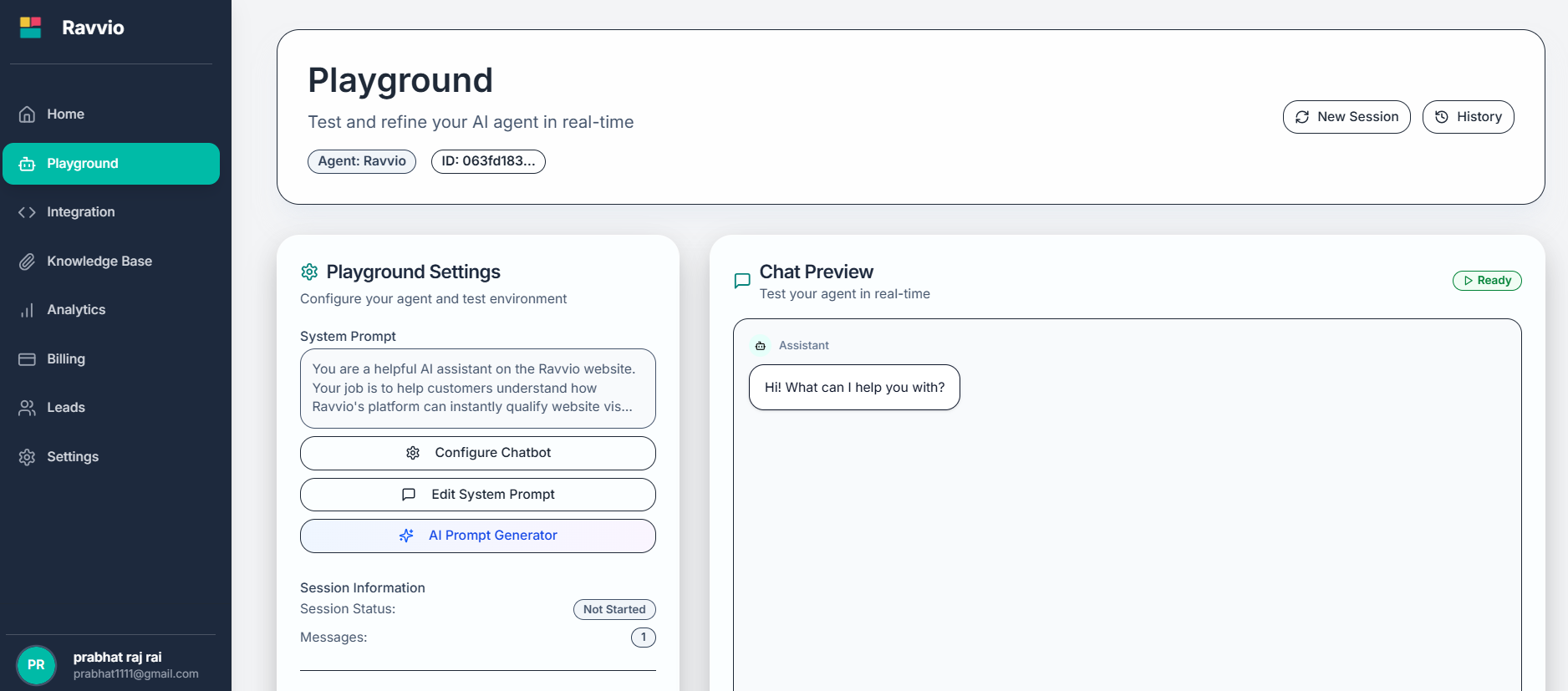 ### Purpose and Importance
Establishes how your agent responds to different types of questions and situations
Defines the tone, style, and character traits your agent displays
Ensures agent responses align with your company's voice and values
Creates consistent, professional interactions that meet user expectations
## Configuration Options
### Basic Settings
**Purpose**: Define your agent's primary function and area of expertise
**Examples**:
* "Customer Support Assistant" - for handling customer inquiries
* "Sales Representative" - for lead qualification and product information
* "Technical Advisor" - for troubleshooting and technical guidance
* "General Assistant" - for broad-based help and information
**Best Practice**: Be specific about the agent's role to improve response relevance
**Purpose**: Set character traits that influence conversation style
**Options**:
* **Friendly and Approachable**: Warm, welcoming, uses casual language
* **Professional and Formal**: Business-like, proper grammar, respectful
* **Helpful and Patient**: Understanding, takes time to explain concepts
* **Knowledgeable and Confident**: Authoritative, provides detailed information
**Customization**: Mix and match traits to create unique personality combinations
**Purpose**: Specify knowledge domains where your agent should excel
**Categories**:
* **Product Features**: Detailed knowledge about your offerings
* **Pricing and Plans**: Subscription options, costs, and comparisons
* **Technical Support**: Troubleshooting, setup, and problem-solving
* **Company Information**: History, mission, contact details, policies
**Configuration**: List specific areas relevant to your business
**Concise Responses**: Brief, direct answers focused on key information
**Detailed Responses**: Comprehensive explanations with context and examples
**Balanced Approach**: Mix of concise and detailed based on question complexity
**Recommendation**: Choose style based on your audience's preferences and use cases
**Professional**: Formal business language, proper grammar, respectful approach
**Friendly**: Warm and approachable while maintaining professionalism\
**Casual**: Relaxed, conversational style with informal language
**Enthusiastic**: Energetic, positive, and engaging communication
**Selection**: Align tone with your brand voice and target audience
### Purpose and Importance
Establishes how your agent responds to different types of questions and situations
Defines the tone, style, and character traits your agent displays
Ensures agent responses align with your company's voice and values
Creates consistent, professional interactions that meet user expectations
## Configuration Options
### Basic Settings
**Purpose**: Define your agent's primary function and area of expertise
**Examples**:
* "Customer Support Assistant" - for handling customer inquiries
* "Sales Representative" - for lead qualification and product information
* "Technical Advisor" - for troubleshooting and technical guidance
* "General Assistant" - for broad-based help and information
**Best Practice**: Be specific about the agent's role to improve response relevance
**Purpose**: Set character traits that influence conversation style
**Options**:
* **Friendly and Approachable**: Warm, welcoming, uses casual language
* **Professional and Formal**: Business-like, proper grammar, respectful
* **Helpful and Patient**: Understanding, takes time to explain concepts
* **Knowledgeable and Confident**: Authoritative, provides detailed information
**Customization**: Mix and match traits to create unique personality combinations
**Purpose**: Specify knowledge domains where your agent should excel
**Categories**:
* **Product Features**: Detailed knowledge about your offerings
* **Pricing and Plans**: Subscription options, costs, and comparisons
* **Technical Support**: Troubleshooting, setup, and problem-solving
* **Company Information**: History, mission, contact details, policies
**Configuration**: List specific areas relevant to your business
**Concise Responses**: Brief, direct answers focused on key information
**Detailed Responses**: Comprehensive explanations with context and examples
**Balanced Approach**: Mix of concise and detailed based on question complexity
**Recommendation**: Choose style based on your audience's preferences and use cases
**Professional**: Formal business language, proper grammar, respectful approach
**Friendly**: Warm and approachable while maintaining professionalism\
**Casual**: Relaxed, conversational style with informal language
**Enthusiastic**: Energetic, positive, and engaging communication
**Selection**: Align tone with your brand voice and target audience
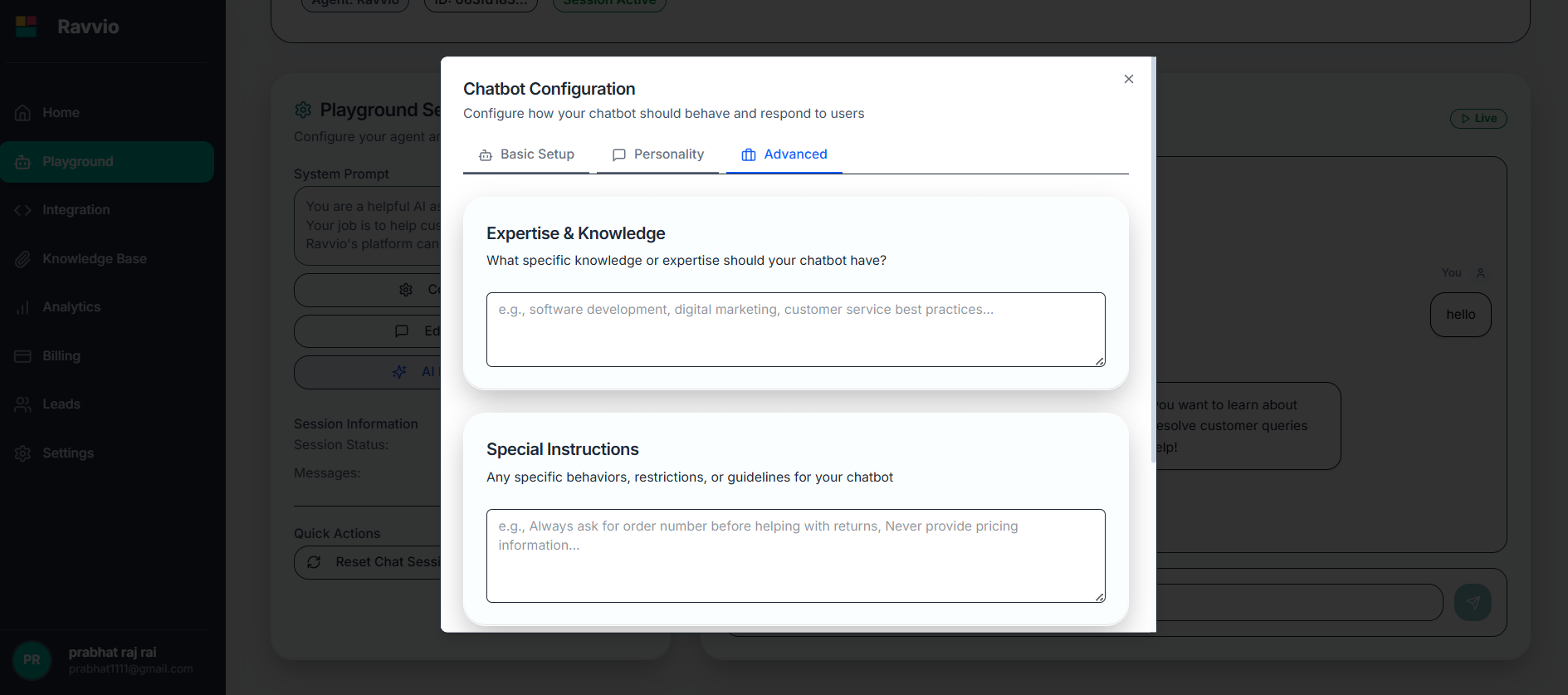 ### Advanced Settings
**Purpose**: Add specific guidelines for unique situations or requirements
**Examples**:
* "Always ask for contact information before providing pricing"
* "Refer complex technical issues to human support"
* "Mention current promotions when relevant"
* "Use metric measurements for international customers"
**Purpose**: Provide relevant company background and information
**Include**:
* Company mission and values
* Key product differentiators
* Target customer segments
* Common customer pain points
* Competitive advantages
**Purpose**: Ensure consistent response formatting and presentation
**Automatic Features**:
* Proper line breaks between paragraphs
* Bold text for emphasis and headings
* Bullet points for lists and options
* Structured responses for complex information
## Configuration Methods
### Guided Configuration Wizard
Interactive form that walks through each configuration option systematically
See how your selections affect agent responses as you configure
Contextual guidance and recommendations for optimal settings
Automatic verification that configuration is complete and effective
#### Wizard Process Flow
Select primary agent function from predefined options or create custom role
Choose personality traits that match your brand and user expectations
Define knowledge areas and specialization topics
Set communication preferences for response format and voice
Add company context and specific instructions
Preview configuration and test with sample conversations
### Template-Based Configuration
**E-commerce**: Product recommendations, order support, return policies
**SaaS/Technology**: Feature explanations, troubleshooting, subscription help
**Healthcare**: Appointment scheduling, general information, resource guidance
**Education**: Course information, enrollment assistance, academic support
**Professional Services**: Consultation booking, service explanations, qualification
**Customer Support**: Issue resolution focus with escalation procedures
**Sales Assistant**: Lead qualification and product demonstration emphasis
**Information Bot**: Comprehensive knowledge sharing and resource direction
**Booking Agent**: Scheduling, availability, and appointment management
* Modify template language to match your brand voice
* Add industry-specific terminology and concepts
* Include company-specific information and policies
* Adjust response length and detail level preferences
## Best Practices for System Prompts
### Writing Effective Prompts
Use clear, specific language that leaves no ambiguity about expected behavior
Address all major interaction scenarios your agent will encounter
Ensure language and tone align perfectly with your company's voice
Prioritize user needs and experience in all response guidelines
### Common Pitfalls to Avoid
**Problem**: Vague prompts like "be helpful" don't provide specific guidance
**Solution**: Include concrete examples and specific behavioral expectations
**Example**: Instead of "be helpful," use "provide step-by-step solutions with clear explanations"
**Problem**: Instructions that contradict each other confuse the agent
**Solution**: Review entire prompt for consistency and logical flow
**Example**: Don't combine "be brief" with "provide detailed explanations"
**Problem**: Agent lacks business context to provide relevant responses
**Solution**: Include comprehensive company and product information
**Example**: Add product features, pricing structures, and customer segments
**Problem**: Prompts exceeding 500 words may not be fully processed
**Solution**: Edit for conciseness while maintaining essential information
**Example**: Use bullet points and structured formatting for efficiency
## Testing and Validation
### System Prompt Testing Process
Test basic functionality with simple questions to verify core behavior
Run through common customer interaction scenarios
Test unusual or challenging questions to assess response quality
Verify responses maintain consistent tone and style across interactions
Refine prompt based on testing results and user feedback
### Testing Scenarios
Test with typical customer inquiries your business receives regularly
Evaluate performance with multi-part questions and detailed requests
Verify appropriate responses to questions outside expertise area
Ensure professional handling of complaints or sensitive issues
## Prompt Optimization Strategies
### Iterative Improvement
* Track response quality and user satisfaction
* Analyze conversation logs for improvement opportunities
* Monitor response times and system performance
* Collect user feedback on agent interactions
* Regular review and update cycles
* A/B testing of different prompt variations
* Seasonal adjustments for business changes
* Integration of new product or service information
* Use analytics to identify successful response patterns
* Analyze user drop-off points in conversations
* Track conversion rates and goal completion
* Monitor escalation rates to human support
### Version Management
Keep track of system prompt changes to enable rollback if needed and measure improvement over time.
#### Version Control Best Practices
* **Document Changes**: Record what was modified and why
* **Performance Tracking**: Compare metrics before and after changes
* **Backup Previous Versions**: Maintain copies of working configurations
* **Change Scheduling**: Implement updates during low-traffic periods
## Integration with Other Features
### System Prompt and Knowledge Base
System prompt provides behavior guidance while knowledge base supplies factual content
Ensure knowledge base content aligns with system prompt personality
System prompt should guide how to use knowledge base information effectively
### Lead Capture Integration
Configure system prompt to naturally introduce lead capture when appropriate
Include guidance on presenting benefits of providing contact information
Specify when and how to request user information during conversations
**Regular Reviews**: Schedule monthly reviews of your system prompt to ensure it stays current with business changes and performance optimizations.
Changes to system prompts affect all future conversations immediately. Test thoroughly before applying updates to production agents.
### Advanced Settings
**Purpose**: Add specific guidelines for unique situations or requirements
**Examples**:
* "Always ask for contact information before providing pricing"
* "Refer complex technical issues to human support"
* "Mention current promotions when relevant"
* "Use metric measurements for international customers"
**Purpose**: Provide relevant company background and information
**Include**:
* Company mission and values
* Key product differentiators
* Target customer segments
* Common customer pain points
* Competitive advantages
**Purpose**: Ensure consistent response formatting and presentation
**Automatic Features**:
* Proper line breaks between paragraphs
* Bold text for emphasis and headings
* Bullet points for lists and options
* Structured responses for complex information
## Configuration Methods
### Guided Configuration Wizard
Interactive form that walks through each configuration option systematically
See how your selections affect agent responses as you configure
Contextual guidance and recommendations for optimal settings
Automatic verification that configuration is complete and effective
#### Wizard Process Flow
Select primary agent function from predefined options or create custom role
Choose personality traits that match your brand and user expectations
Define knowledge areas and specialization topics
Set communication preferences for response format and voice
Add company context and specific instructions
Preview configuration and test with sample conversations
### Template-Based Configuration
**E-commerce**: Product recommendations, order support, return policies
**SaaS/Technology**: Feature explanations, troubleshooting, subscription help
**Healthcare**: Appointment scheduling, general information, resource guidance
**Education**: Course information, enrollment assistance, academic support
**Professional Services**: Consultation booking, service explanations, qualification
**Customer Support**: Issue resolution focus with escalation procedures
**Sales Assistant**: Lead qualification and product demonstration emphasis
**Information Bot**: Comprehensive knowledge sharing and resource direction
**Booking Agent**: Scheduling, availability, and appointment management
* Modify template language to match your brand voice
* Add industry-specific terminology and concepts
* Include company-specific information and policies
* Adjust response length and detail level preferences
## Best Practices for System Prompts
### Writing Effective Prompts
Use clear, specific language that leaves no ambiguity about expected behavior
Address all major interaction scenarios your agent will encounter
Ensure language and tone align perfectly with your company's voice
Prioritize user needs and experience in all response guidelines
### Common Pitfalls to Avoid
**Problem**: Vague prompts like "be helpful" don't provide specific guidance
**Solution**: Include concrete examples and specific behavioral expectations
**Example**: Instead of "be helpful," use "provide step-by-step solutions with clear explanations"
**Problem**: Instructions that contradict each other confuse the agent
**Solution**: Review entire prompt for consistency and logical flow
**Example**: Don't combine "be brief" with "provide detailed explanations"
**Problem**: Agent lacks business context to provide relevant responses
**Solution**: Include comprehensive company and product information
**Example**: Add product features, pricing structures, and customer segments
**Problem**: Prompts exceeding 500 words may not be fully processed
**Solution**: Edit for conciseness while maintaining essential information
**Example**: Use bullet points and structured formatting for efficiency
## Testing and Validation
### System Prompt Testing Process
Test basic functionality with simple questions to verify core behavior
Run through common customer interaction scenarios
Test unusual or challenging questions to assess response quality
Verify responses maintain consistent tone and style across interactions
Refine prompt based on testing results and user feedback
### Testing Scenarios
Test with typical customer inquiries your business receives regularly
Evaluate performance with multi-part questions and detailed requests
Verify appropriate responses to questions outside expertise area
Ensure professional handling of complaints or sensitive issues
## Prompt Optimization Strategies
### Iterative Improvement
* Track response quality and user satisfaction
* Analyze conversation logs for improvement opportunities
* Monitor response times and system performance
* Collect user feedback on agent interactions
* Regular review and update cycles
* A/B testing of different prompt variations
* Seasonal adjustments for business changes
* Integration of new product or service information
* Use analytics to identify successful response patterns
* Analyze user drop-off points in conversations
* Track conversion rates and goal completion
* Monitor escalation rates to human support
### Version Management
Keep track of system prompt changes to enable rollback if needed and measure improvement over time.
#### Version Control Best Practices
* **Document Changes**: Record what was modified and why
* **Performance Tracking**: Compare metrics before and after changes
* **Backup Previous Versions**: Maintain copies of working configurations
* **Change Scheduling**: Implement updates during low-traffic periods
## Integration with Other Features
### System Prompt and Knowledge Base
System prompt provides behavior guidance while knowledge base supplies factual content
Ensure knowledge base content aligns with system prompt personality
System prompt should guide how to use knowledge base information effectively
### Lead Capture Integration
Configure system prompt to naturally introduce lead capture when appropriate
Include guidance on presenting benefits of providing contact information
Specify when and how to request user information during conversations
**Regular Reviews**: Schedule monthly reviews of your system prompt to ensure it stays current with business changes and performance optimizations.
Changes to system prompts affect all future conversations immediately. Test thoroughly before applying updates to production agents.