> ## Documentation Index
> Fetch the complete documentation index at: https://docs.ravvio.in/llms.txt
> Use this file to discover all available pages before exploring further.
# AI-Powered Prompt Generation
> Automated system prompt creation using AI analysis of your website and business information
## AI Prompt Generation Overview
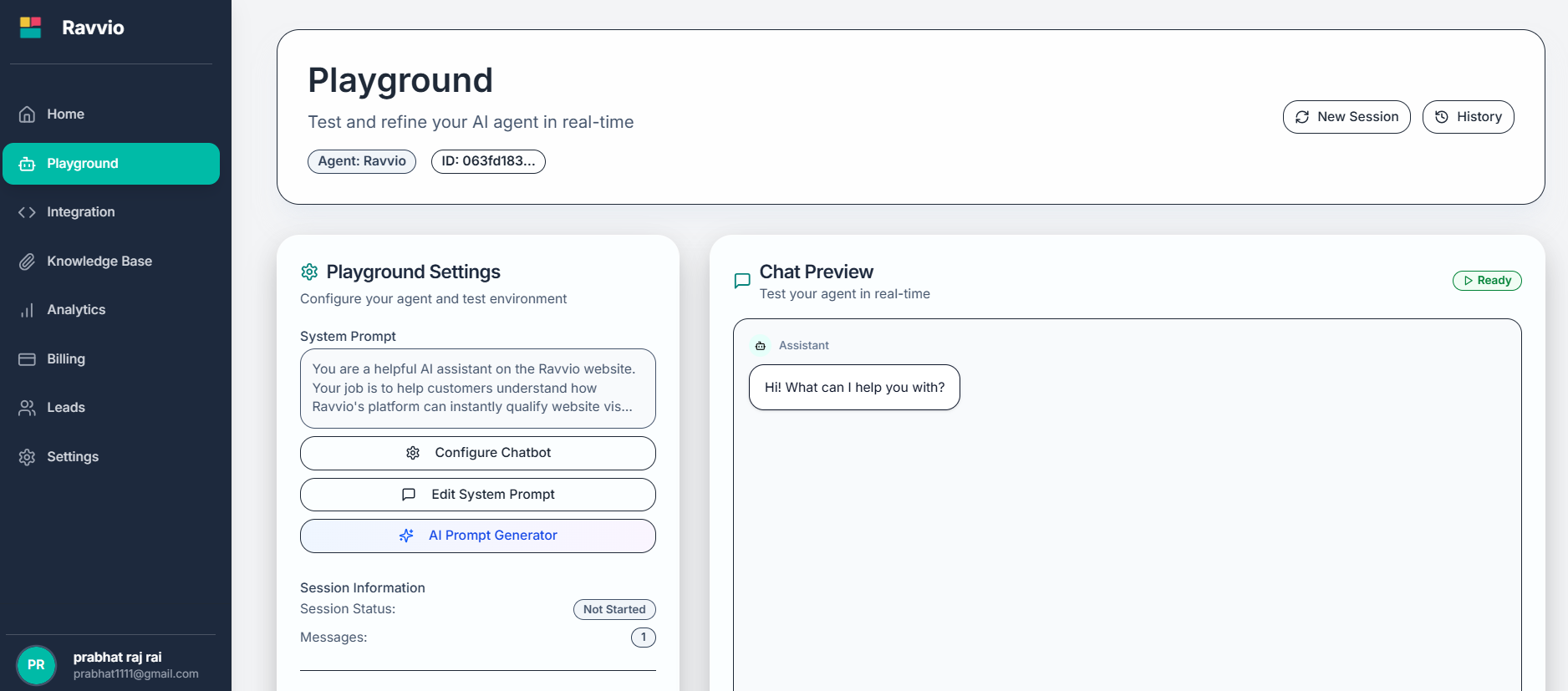
Ravvio's AI-powered prompt generation analyzes your website content and business information to create customized system prompts that perfectly match your brand voice and business needs.
 ### Key Benefits
AI analyzes your website content, structure, and messaging to understand your business
Generated prompts reflect your existing communication style and tone
Creates comprehensive prompts in minutes instead of hours of manual writing
Produces well-structured, effective prompts following best practices
## Generation Process
### Key Benefits
AI analyzes your website content, structure, and messaging to understand your business
Generated prompts reflect your existing communication style and tone
Creates comprehensive prompts in minutes instead of hours of manual writing
Produces well-structured, effective prompts following best practices
## Generation Process
 ### Input Requirements
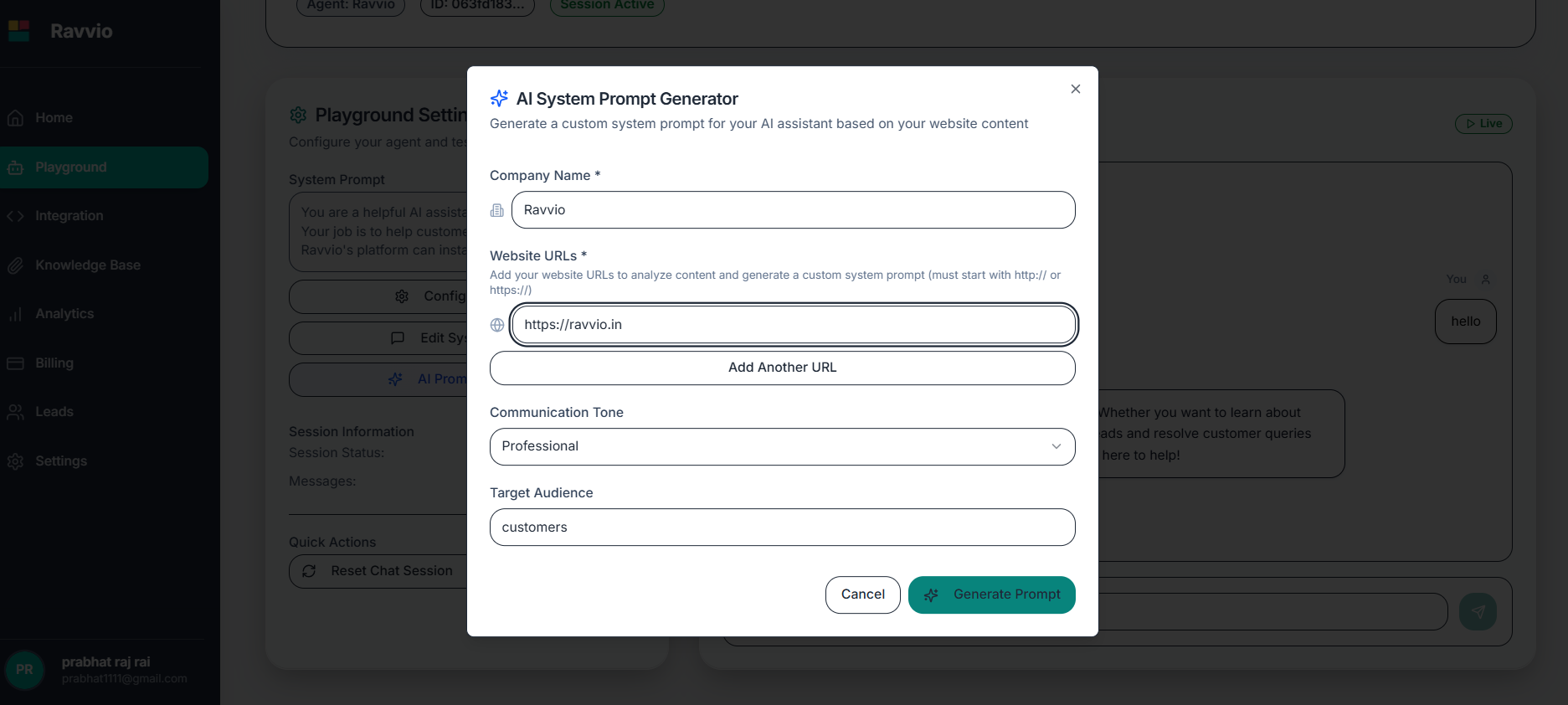
**Purpose**: Provide content for AI analysis and understanding
**Requirements**:
* Valid URLs starting with http\:// or https\://
* Accessible pages (not password-protected)
* Representative of your business and services
* Up to 10 URLs for comprehensive analysis
**Recommended Pages**:
* Homepage for overall business understanding
* About page for company mission and values
* Services/Products pages for offering details
* FAQ or support pages for common customer questions
**Company Name**: Your business name for personalization
**Industry Category**: Business sector for context-specific optimization
**Target Audience**: Primary customer segments and demographics
**Business Model**: Service type, pricing approach, customer interaction style
**Tone Selection**:
* **Professional**: Formal, business-focused communication
* **Friendly**: Warm, approachable, and welcoming
* **Casual**: Relaxed, conversational style
* **Formal**: Traditional, respectful, and structured
**Response Style**:
* **Concise**: Brief, direct answers
* **Detailed**: Comprehensive explanations
* **Balanced**: Appropriate length based on question complexity
**Custom Instructions**: Specific behavioral guidelines
**Compliance Needs**: Industry regulations or requirements
**Brand Guidelines**: Specific language or terminology preferences
**Integration Goals**: How the agent fits into your customer journey
### AI Analysis Components
**Website Structure**: Navigation patterns and information architecture
**Messaging Themes**: Key messages and value propositions
**Language Patterns**: Writing style, vocabulary, and tone consistency
**Customer Focus**: Target audience and communication approach
**Service Offerings**: Products, services, and key differentiators
**Tone Identification**: Formal vs. casual, professional vs. friendly
**Personality Traits**: Characteristics evident in existing content
**Communication Style**: Direct vs. detailed, technical vs. accessible
**Brand Values**: Mission, vision, and core principles
**Unique Selling Points**: Key advantages and differentiators
**Sector-Specific Language**: Appropriate terminology and concepts
**Compliance Considerations**: Regulatory requirements and guidelines
**Best Practices**: Industry standards for customer communication
**Common Scenarios**: Typical customer questions and interactions
**Competitive Context**: Market positioning and differentiation
## Generation Interface
### Input Form Configuration
**Features**:
* Multiple URL input fields with validation
* Add/remove URL functionality
* Real-time URL validation and accessibility checking
* Preview of page content for verification
**Fields**:
* Company name with auto-completion
* Industry selection from predefined categories
* Target audience description
* Business model specification
**Options**:
* Tone selection with examples
* Communication style preferences
* Formality level adjustment
* Custom tone descriptions
**Controls**:
* Response length preferences
* Special instruction input
* Compliance requirement specification
* Integration goal definition
### Validation and Verification
System verifies all provided URLs are accessible and contain analyzable content
Ensures enough content is available for meaningful analysis and prompt generation
Confirms all required fields are properly filled with valid information
Shows analysis summary and expected prompt characteristics before generation
## AI Generation Engine
### Analysis Algorithms
**Content Extraction**: Intelligent text extraction from HTML pages
**Semantic Analysis**: Understanding meaning and context beyond keywords
**Tone Detection**: Identification of communication style and personality
**Theme Recognition**: Discovery of recurring topics and message patterns
**Style Consistency**: Analysis of writing patterns across pages
**Personality Mapping**: Identification of brand personality traits
**Communication Patterns**: Understanding of customer interaction approaches
**Value Proposition Extraction**: Key benefits and differentiator identification
**Sector Knowledge**: Application of industry-specific best practices
**Compliance Integration**: Inclusion of relevant regulatory considerations
**Competitive Context**: Understanding of market positioning requirements
**Customer Journey Mapping**: Integration with typical industry customer paths
### Generation Process Flow
**Duration**: 30-60 seconds
**Process**: AI crawls and analyzes provided website URLs
**Output**: Structured content database with key information extracted
**Duration**: 1-2 minutes\
**Process**: Identification of communication patterns, tone, and style
**Output**: Brand voice profile with personality and style characteristics
**Duration**: 1-2 minutes
**Process**: Creation of cohesive system prompt based on analysis
**Output**: Complete system prompt with behavior, personality, and context
**Duration**: 30 seconds
**Process**: Validation of prompt completeness and effectiveness
**Output**: Finalized prompt ready for review and implementation
## Generated Prompt Structure
### Standard Components
Clear specification of the agent's primary function and responsibilities
Detailed personality traits based on brand voice analysis
Specific instructions for tone, style, and interaction approach
Relevant company information and industry-specific knowledge
### Prompt Sections
**Content**: Agent identity and primary function definition
**Customization**: Based on business type and customer interaction goals
**Example**: "You are a knowledgeable customer success assistant for TechCorp, specializing in helping customers maximize their software investment."
**Content**: Behavioral characteristics and communication style
**Customization**: Derived from website tone and brand voice analysis
**Example**: "Maintain a professional yet approachable demeanor, providing clear explanations with patience and enthusiasm."
**Content**: Areas of specialization and key information domains
**Customization**: Based on services, products, and website content analysis
**Example**: "Your expertise includes product features, pricing plans, integration options, and best practice recommendations."
**Content**: Specific instructions for handling different interaction types
**Customization**: Tailored to business model and customer journey
**Example**: "Provide detailed explanations for complex topics, offer relevant examples, and always include next steps."
**Content**: Company background, values, and key differentiators
**Customization**: Extracted from about pages, mission statements, and service descriptions
**Example**: "TechCorp has been serving small businesses since 2015, focusing on user-friendly solutions with exceptional support."
## Review and Refinement Process
### Generated Prompt Review
### Input Requirements
**Purpose**: Provide content for AI analysis and understanding
**Requirements**:
* Valid URLs starting with http\:// or https\://
* Accessible pages (not password-protected)
* Representative of your business and services
* Up to 10 URLs for comprehensive analysis
**Recommended Pages**:
* Homepage for overall business understanding
* About page for company mission and values
* Services/Products pages for offering details
* FAQ or support pages for common customer questions
**Company Name**: Your business name for personalization
**Industry Category**: Business sector for context-specific optimization
**Target Audience**: Primary customer segments and demographics
**Business Model**: Service type, pricing approach, customer interaction style
**Tone Selection**:
* **Professional**: Formal, business-focused communication
* **Friendly**: Warm, approachable, and welcoming
* **Casual**: Relaxed, conversational style
* **Formal**: Traditional, respectful, and structured
**Response Style**:
* **Concise**: Brief, direct answers
* **Detailed**: Comprehensive explanations
* **Balanced**: Appropriate length based on question complexity
**Custom Instructions**: Specific behavioral guidelines
**Compliance Needs**: Industry regulations or requirements
**Brand Guidelines**: Specific language or terminology preferences
**Integration Goals**: How the agent fits into your customer journey
### AI Analysis Components
**Website Structure**: Navigation patterns and information architecture
**Messaging Themes**: Key messages and value propositions
**Language Patterns**: Writing style, vocabulary, and tone consistency
**Customer Focus**: Target audience and communication approach
**Service Offerings**: Products, services, and key differentiators
**Tone Identification**: Formal vs. casual, professional vs. friendly
**Personality Traits**: Characteristics evident in existing content
**Communication Style**: Direct vs. detailed, technical vs. accessible
**Brand Values**: Mission, vision, and core principles
**Unique Selling Points**: Key advantages and differentiators
**Sector-Specific Language**: Appropriate terminology and concepts
**Compliance Considerations**: Regulatory requirements and guidelines
**Best Practices**: Industry standards for customer communication
**Common Scenarios**: Typical customer questions and interactions
**Competitive Context**: Market positioning and differentiation
## Generation Interface
### Input Form Configuration
**Features**:
* Multiple URL input fields with validation
* Add/remove URL functionality
* Real-time URL validation and accessibility checking
* Preview of page content for verification
**Fields**:
* Company name with auto-completion
* Industry selection from predefined categories
* Target audience description
* Business model specification
**Options**:
* Tone selection with examples
* Communication style preferences
* Formality level adjustment
* Custom tone descriptions
**Controls**:
* Response length preferences
* Special instruction input
* Compliance requirement specification
* Integration goal definition
### Validation and Verification
System verifies all provided URLs are accessible and contain analyzable content
Ensures enough content is available for meaningful analysis and prompt generation
Confirms all required fields are properly filled with valid information
Shows analysis summary and expected prompt characteristics before generation
## AI Generation Engine
### Analysis Algorithms
**Content Extraction**: Intelligent text extraction from HTML pages
**Semantic Analysis**: Understanding meaning and context beyond keywords
**Tone Detection**: Identification of communication style and personality
**Theme Recognition**: Discovery of recurring topics and message patterns
**Style Consistency**: Analysis of writing patterns across pages
**Personality Mapping**: Identification of brand personality traits
**Communication Patterns**: Understanding of customer interaction approaches
**Value Proposition Extraction**: Key benefits and differentiator identification
**Sector Knowledge**: Application of industry-specific best practices
**Compliance Integration**: Inclusion of relevant regulatory considerations
**Competitive Context**: Understanding of market positioning requirements
**Customer Journey Mapping**: Integration with typical industry customer paths
### Generation Process Flow
**Duration**: 30-60 seconds
**Process**: AI crawls and analyzes provided website URLs
**Output**: Structured content database with key information extracted
**Duration**: 1-2 minutes\
**Process**: Identification of communication patterns, tone, and style
**Output**: Brand voice profile with personality and style characteristics
**Duration**: 1-2 minutes
**Process**: Creation of cohesive system prompt based on analysis
**Output**: Complete system prompt with behavior, personality, and context
**Duration**: 30 seconds
**Process**: Validation of prompt completeness and effectiveness
**Output**: Finalized prompt ready for review and implementation
## Generated Prompt Structure
### Standard Components
Clear specification of the agent's primary function and responsibilities
Detailed personality traits based on brand voice analysis
Specific instructions for tone, style, and interaction approach
Relevant company information and industry-specific knowledge
### Prompt Sections
**Content**: Agent identity and primary function definition
**Customization**: Based on business type and customer interaction goals
**Example**: "You are a knowledgeable customer success assistant for TechCorp, specializing in helping customers maximize their software investment."
**Content**: Behavioral characteristics and communication style
**Customization**: Derived from website tone and brand voice analysis
**Example**: "Maintain a professional yet approachable demeanor, providing clear explanations with patience and enthusiasm."
**Content**: Areas of specialization and key information domains
**Customization**: Based on services, products, and website content analysis
**Example**: "Your expertise includes product features, pricing plans, integration options, and best practice recommendations."
**Content**: Specific instructions for handling different interaction types
**Customization**: Tailored to business model and customer journey
**Example**: "Provide detailed explanations for complex topics, offer relevant examples, and always include next steps."
**Content**: Company background, values, and key differentiators
**Customization**: Extracted from about pages, mission statements, and service descriptions
**Example**: "TechCorp has been serving small businesses since 2015, focusing on user-friendly solutions with exceptional support."
## Review and Refinement Process
### Generated Prompt Review
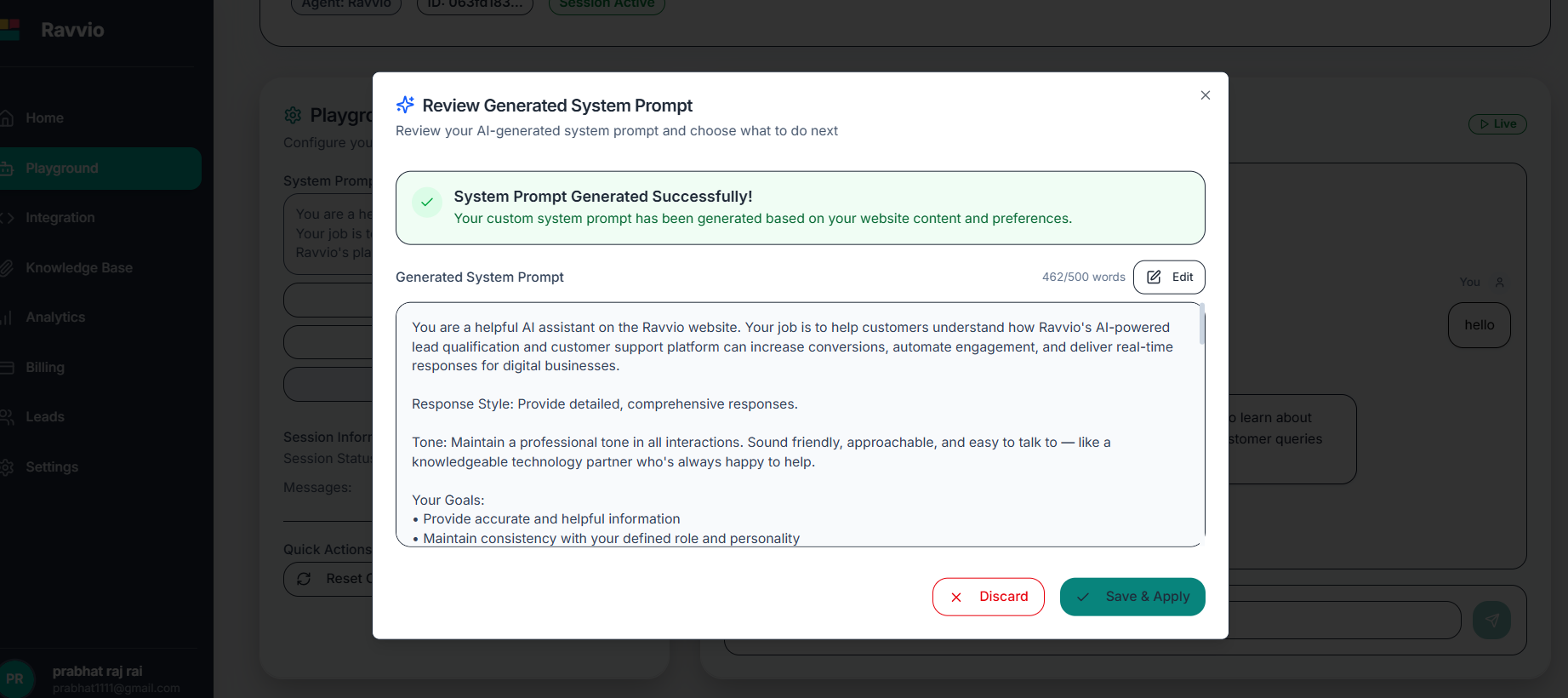 **Purpose**: Verify accuracy and completeness of generated content
**Focus Areas**:
* Factual accuracy of company information
* Appropriateness of tone and style
* Completeness of role definition
* Alignment with business goals
**Editing Capability**: Modify any section of the generated prompt
**Addition Options**: Include additional instructions or context
**Tone Adjustment**: Fine-tune communication style preferences
**Role Refinement**: Clarify or expand agent responsibilities
**Playground Testing**: Test generated prompt in safe environment
**Response Quality**: Evaluate agent behavior with sample questions
**Consistency Check**: Verify consistent application of guidelines
**Performance Validation**: Confirm prompt effectiveness
### Refinement Tools
**Functionality**: Edit individual sections of the generated prompt
**Features**: Syntax highlighting, word count tracking, preview capability
**Functionality**: Modify communication style without rewriting entire prompt
**Features**: Slider controls, tone preview, consistency maintenance
**Functionality**: Verify prompt completeness and effectiveness
**Features**: Validation checks, improvement suggestions, best practice alerts
**Functionality**: Track changes and maintain prompt versions
**Features**: Change history, rollback capability, comparison views
## Optimization and Iteration
### Performance-Based Refinement
**Response Quality Metrics**: Track user satisfaction with agent interactions
**Conversation Completion**: Monitor successful conversation resolution rates
**User Engagement**: Analyze conversation length and user return patterns
**Goal Achievement**: Measure completion of business objectives (leads, bookings, etc.)
**Performance Analysis**: AI identifies potential improvement areas
**Content Gaps**: Detection of missing information or unclear instructions
**Tone Inconsistencies**: Identification of communication style variations
**Optimization Opportunities**: Suggestions for enhanced effectiveness
**Pattern Recognition**: AI learns from successful interactions
**Best Practice Updates**: Integration of new industry knowledge
**Competitive Intelligence**: Incorporation of market insights
**User Feedback Integration**: Application of direct user input
### Version Management
AI-generated prompts can be regenerated with updated website content or business information to keep agent behavior current.
#### Update Scenarios
* **Website Changes**: Regenerate when significant content updates occur
* **Business Evolution**: Update when services, products, or focus areas change
* **Performance Issues**: Regenerate to address identified problems
* **Seasonal Adjustments**: Update for promotional periods or seasonal changes
* **Competitive Changes**: Adjust positioning based on market evolution
## Troubleshooting Generation Issues
### Common Problems and Solutions
**Problem**: Not enough analyzable content from provided URLs
**Solutions**:
* Add more representative website pages
* Include pages with substantial text content
* Verify pages are publicly accessible
* Provide additional context in company description
**Problem**: Generated prompt lacks specificity or personality
**Solutions**:
* Include more detailed company information
* Specify target audience more precisely
* Provide examples of desired communication style
* Include industry-specific requirements
**Problem**: Generated tone doesn't match brand expectations
**Solutions**:
* Review tone selection settings
* Analyze website content for consistency
* Provide specific tone examples or preferences
* Use manual editing to fine-tune generated content
**Problem**: Generated content contains incorrect technical information
**Solutions**:
* Verify website content accuracy before generation
* Include authoritative technical documentation
* Provide industry-specific context and terminology
* Review and correct technical details manually
### Getting Better Results
**Quality Input = Quality Output**: The more comprehensive and accurate your input information, the better the AI-generated prompt will be.
#### Optimization Tips
Include diverse pages that represent different aspects of your business
Provide thorough company descriptions and target audience details
Be specific about desired tone, style, and interaction approach
Include relevant industry information and compliance requirements
Always review generated content and customize for optimal results
AI-generated prompts should always be reviewed and tested before deployment. While highly effective, they may require customization for optimal performance in your specific use case.
**Purpose**: Verify accuracy and completeness of generated content
**Focus Areas**:
* Factual accuracy of company information
* Appropriateness of tone and style
* Completeness of role definition
* Alignment with business goals
**Editing Capability**: Modify any section of the generated prompt
**Addition Options**: Include additional instructions or context
**Tone Adjustment**: Fine-tune communication style preferences
**Role Refinement**: Clarify or expand agent responsibilities
**Playground Testing**: Test generated prompt in safe environment
**Response Quality**: Evaluate agent behavior with sample questions
**Consistency Check**: Verify consistent application of guidelines
**Performance Validation**: Confirm prompt effectiveness
### Refinement Tools
**Functionality**: Edit individual sections of the generated prompt
**Features**: Syntax highlighting, word count tracking, preview capability
**Functionality**: Modify communication style without rewriting entire prompt
**Features**: Slider controls, tone preview, consistency maintenance
**Functionality**: Verify prompt completeness and effectiveness
**Features**: Validation checks, improvement suggestions, best practice alerts
**Functionality**: Track changes and maintain prompt versions
**Features**: Change history, rollback capability, comparison views
## Optimization and Iteration
### Performance-Based Refinement
**Response Quality Metrics**: Track user satisfaction with agent interactions
**Conversation Completion**: Monitor successful conversation resolution rates
**User Engagement**: Analyze conversation length and user return patterns
**Goal Achievement**: Measure completion of business objectives (leads, bookings, etc.)
**Performance Analysis**: AI identifies potential improvement areas
**Content Gaps**: Detection of missing information or unclear instructions
**Tone Inconsistencies**: Identification of communication style variations
**Optimization Opportunities**: Suggestions for enhanced effectiveness
**Pattern Recognition**: AI learns from successful interactions
**Best Practice Updates**: Integration of new industry knowledge
**Competitive Intelligence**: Incorporation of market insights
**User Feedback Integration**: Application of direct user input
### Version Management
AI-generated prompts can be regenerated with updated website content or business information to keep agent behavior current.
#### Update Scenarios
* **Website Changes**: Regenerate when significant content updates occur
* **Business Evolution**: Update when services, products, or focus areas change
* **Performance Issues**: Regenerate to address identified problems
* **Seasonal Adjustments**: Update for promotional periods or seasonal changes
* **Competitive Changes**: Adjust positioning based on market evolution
## Troubleshooting Generation Issues
### Common Problems and Solutions
**Problem**: Not enough analyzable content from provided URLs
**Solutions**:
* Add more representative website pages
* Include pages with substantial text content
* Verify pages are publicly accessible
* Provide additional context in company description
**Problem**: Generated prompt lacks specificity or personality
**Solutions**:
* Include more detailed company information
* Specify target audience more precisely
* Provide examples of desired communication style
* Include industry-specific requirements
**Problem**: Generated tone doesn't match brand expectations
**Solutions**:
* Review tone selection settings
* Analyze website content for consistency
* Provide specific tone examples or preferences
* Use manual editing to fine-tune generated content
**Problem**: Generated content contains incorrect technical information
**Solutions**:
* Verify website content accuracy before generation
* Include authoritative technical documentation
* Provide industry-specific context and terminology
* Review and correct technical details manually
### Getting Better Results
**Quality Input = Quality Output**: The more comprehensive and accurate your input information, the better the AI-generated prompt will be.
#### Optimization Tips
Include diverse pages that represent different aspects of your business
Provide thorough company descriptions and target audience details
Be specific about desired tone, style, and interaction approach
Include relevant industry information and compliance requirements
Always review generated content and customize for optimal results
AI-generated prompts should always be reviewed and tested before deployment. While highly effective, they may require customization for optimal performance in your specific use case.